Time Log Teams – time spent on other Teams’ sites (must have 3 entries or more):
Date: Mar. 8, 2026 From: 08:00pm To: 08:30pm
Date: Mar. 9, 2026 From: 10:00pm To 10:30pm
Date: Mar. 13, 2026 From: 12:15pm To: 12:45pm
Date: Mar. 14, 2026 From: 06:15pm To: 06:45pm
Time Log Students – time spent on other students’ sites (must have 3 entries or more):
Date: Mar. 8, 2026 From: 07:30pm To: 08:00pm
Date: Mar. 9, 2026 From: 9:30pm To: 10:00pm
Date: Mar. 13, 2026 From: 11:45am To: 12:15pm
Date: Mar. 14, 2026 From: 06:45pm To: 07:15pm
Essay I. Summary of your activities in your contents including new contents created (one paragraph). Provide all the hyperlinks (clickable) of new contents you have created this week.
I added two new posts, “Mechatronic Project – Arcade Game Machine” under My Life category and “My Viet Food Guide” under My Learning category. The first post is about an undergraduate project that I’ve worked on where I and my team built an arcade game machine from scratch. I uploaded a Youtube video and embedded the link into the post so that visitors can watch how the machine works. The second post is an introduction to a view of the Vietnamese noodle dishes that I enjoy that are less well known among non Vietnamese. In each of the post, I added new tags so that they are added to the tag cloud at the end of the homepage.
Mechatronic Project – Arcade Game Machine
For this week homework menu, I added a new page HW10 to the navigation bar. This page features the three new posts created for this week. The new posts are automatically added to the My learning and My Life category pages. These category pages are filtered to display only posts that belong to the category.
Essay II. Summary of your KPI table (add screenshots or table) (one paragraph excluding the KPI table)
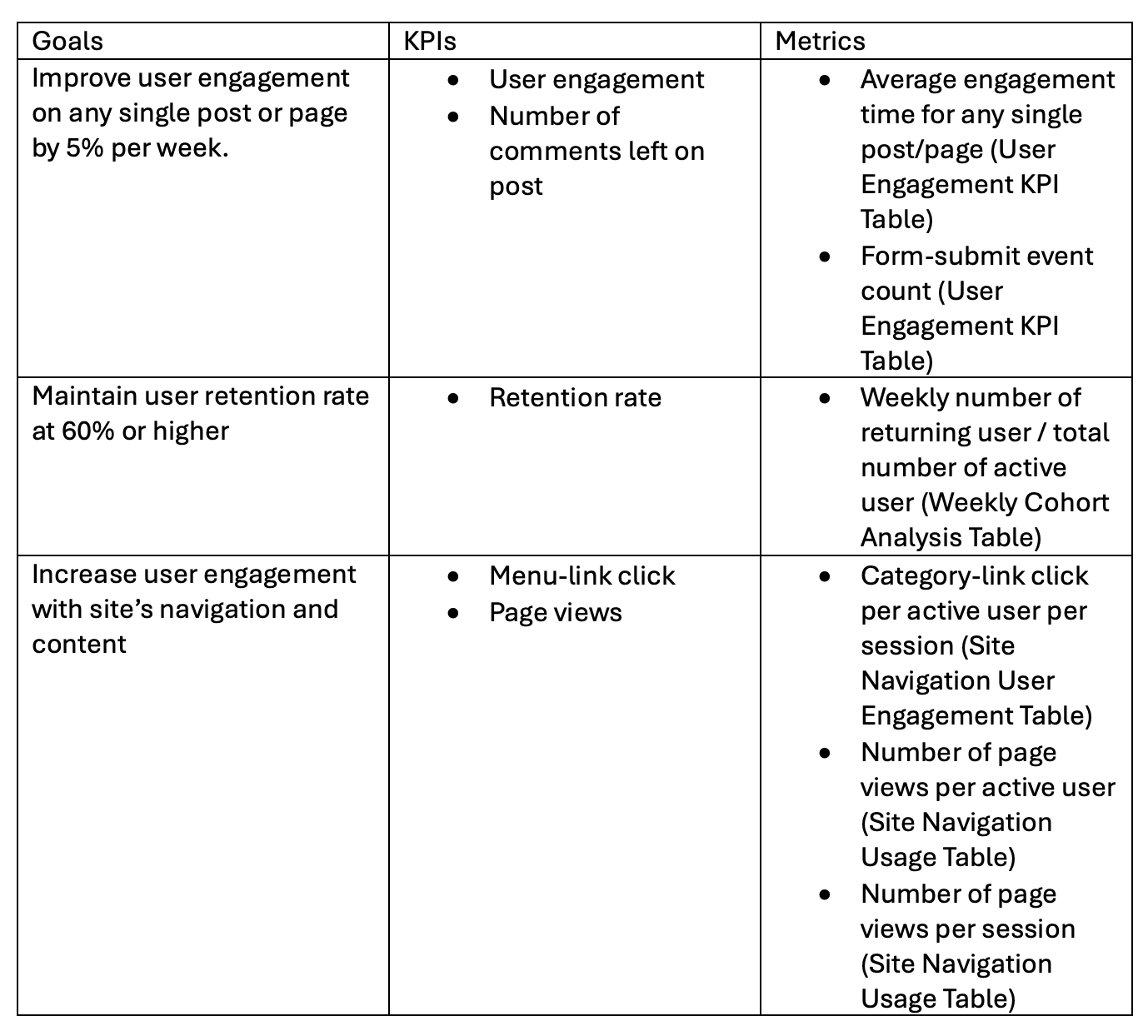
My website content is centered around sharing personal life topics and new things that learned each week. Thus, one of the goals that I set is to improve user engagement throughout the course of the quarter. The key performance indicators for user engagement are the amount of time the users spent on reading a post and whether or not they leave a comment. Comment can be tracked with form submit event count. User engagement time is automatically tracked by GA4. I also created key events using Google Tag Manager to trigger if a user spend at least 30 seconds and 60 seconds on a post. Another goal that I set is to maintain user retention rate above 60%. This is measured by the amount of returning users each week over the total number of active users. For any business, it is very important to build a customer base and returning customers are what keep a business running. The third goal that I set is to improve navigation strategy and encourage users to use the navigation bar to explore new posts. The KPIs for this goal are menu-link click and page views. I have a menu-link click key event created and trigger in Google Tag manager. The number of page views per users is typically tracked by GA4 by default.
Essay III. Summary of your Looker Studio Report with your KPI identified (add screenshots) (one paragraph)
The link to my Locker Studio report is embeded below.
Click Link to view Looker Studio Report
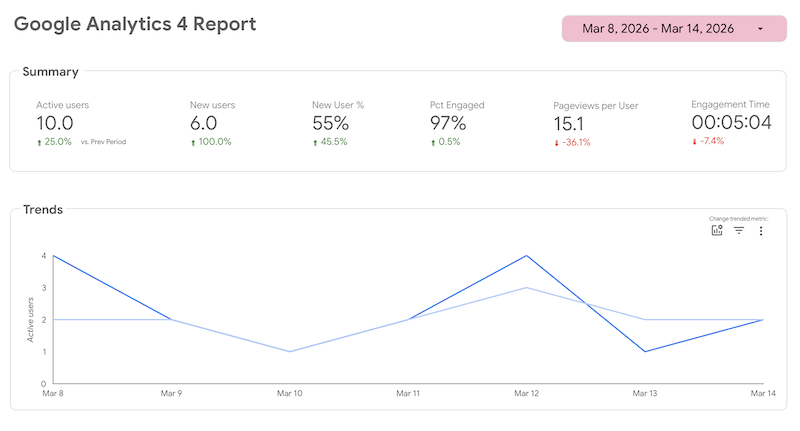
This report was created using the standard GA4 report template in Looker Studio. The report has a time filter to allow the viewers to change the date range that they wish to see. The first page of the report includes a summary of the number of active users and new users, percentage of engagement and engagement time. It can be observed that there are 10 active users in the past week and the average engagement time is 5 minutes.
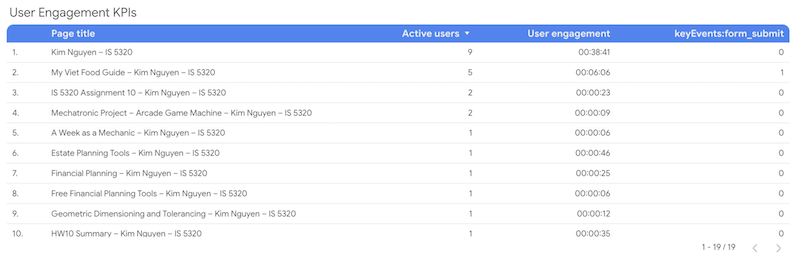
To view user engagement in the report, I’ve created a custom table with columns showing the user engagement metrics that I’ve identified in the KPI table. The table shows a list of page title, number of active users, user engagement and form submit. It can be seen that my new post, My Viet Food Guide, has an average engagement time of 6 minutes with one comment. The other post, Mechatronic Project, has an engagement time of only 9 seconds. This suggests the type of content that visitors would like to see.
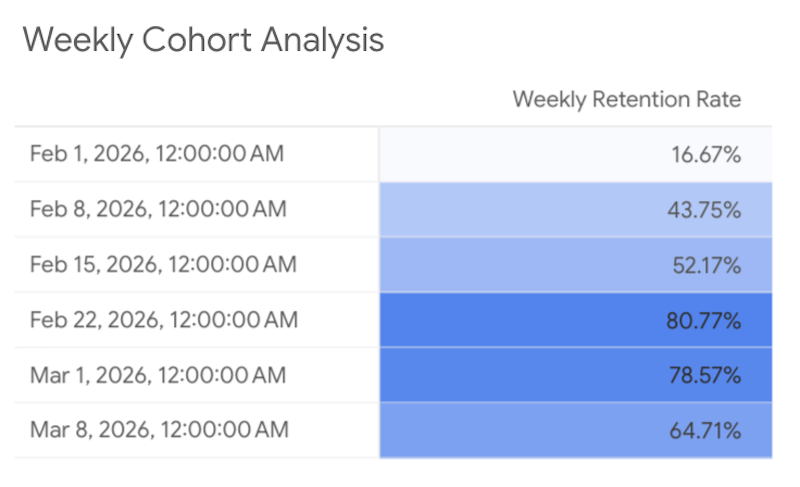
Another custom table that I’ve added is the Weekly Cohort Analysis. This table is not included in the time filter and the data does not change when the view update the time range. My website begins receiving traffic from classmates starting end of January. Thus, I’ve created a custom dimension named Week Start properly display the time range. Weekly Retention Rate metric is calculated using the formula, (Total Users-New Users)/(Total Users). The number of returning users is equal to the total users minus new users. As observed from the table below, the percentages shown suggest that the retention rate for my website is quite low in the first three weeks. Starting week 4, this percentage increased significantly and is maintained above my target of 60% through the final week. The retention rate is increasing throughout each week, which suggests that the website is performing well and is building up a strong base of returning visitors.
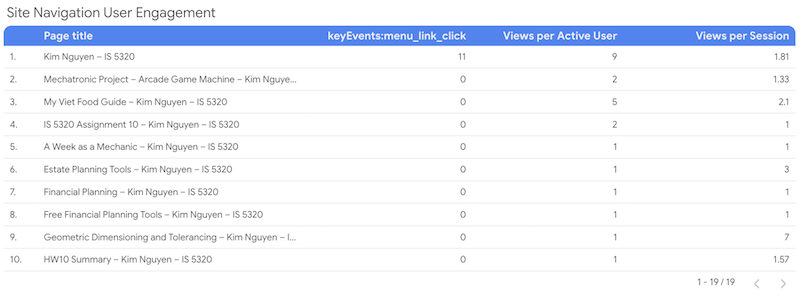
My third KPI was to measure how visitors are using the navigation bar. The custom table shown below includes metrics such as menu link click, views per active user and views per session. From the data, it is observed that visitors are not using the navigation bar to view my posts. It is most likely that visitors access the site’s content by clicking on the links displayed on the homepage, which are typically new sticky posts that I pin to the homepage every week. Viewers might be using my home button to return to the main page to explore other contents after they’re done viewing a post. This is shown by the number of menu link clicks (11) that I have for my homepage. All the other pages except one has a zero count for menu link click. This insight suggests that I need major improvement to my navigation bar to encourage visitors to start using it more.
Leave a Reply