Time Log – time spent on other students’ sites:
Date: Feb 18, 2026, From 7:30pm to 9:00 pm
Date: Feb. 19, 2026, From 8:15pm to 8:45pm
Date: Feb. 20, 2026, From 8:30pm to 10:00pm
Date: Feb. 21, 2026, From 6:00pm to 6:45pm
Date: Feb. 22, 2026, From 1:00am to 1:30am
Essay I: Summary of your activities in your contents including new contents created (one paragraph). Provide all the hyperlinks (clickable) of new contents you have created this week.
I added two new posts this week.
The first post is called “My First Hometown” where I wrote about the city where I was born and grew up before moving to Seattle. This post is added to the My Life category in my homepage and is accessible from the navigation menu as well as from the My Life page.
The second post is a continuation of what I learned in my personal financial planning class where I shared a few free financial planning tools that I was able to research and explore over the past week. I created a new category called “Financial Planning” and reorganized the post I created last week on compound interest into this new category. I updated the previously created My Learning page and titled it Financial Planning and I now have two posts under this new category. I also created a new My Learning page and have the posts listed by category. I currently have one post listed in this page.
I recently learned about “Sticky Posts”, which are posts that are pin to the top of the page. From GA4 analysis and commenting activities that other classmates leave on my website, I noticed that some of the more popular posts are My Hobbies and My Career. Thus, I make these two posts sticky posts along with the new My First Hometown post. These three posts will appear on the top of my homepage blog regardless of published date. Other posts will appear in chronological order based on published date.
For this week assignment, I added the HW7 page as a submenu under HWs page with all the links to the new posts created for this assignment.
Essay II: Summary of your “Event” in GA4 (add a screenshot) (one paragraph)
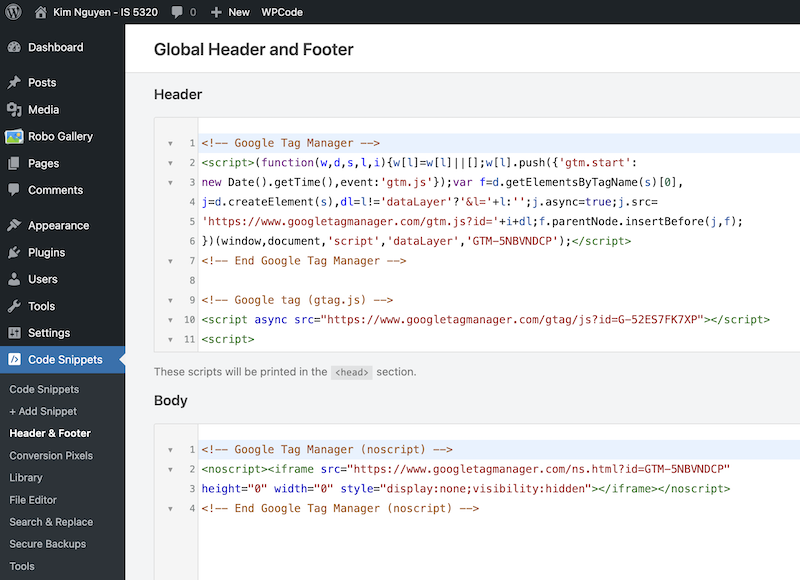
I created a Google Tag Manager account and added the Container Snippet codes into the header and body of my website.
I created four tags, one for my home page and three others for the more popular posts on my website including My Career, My Hobbies and My First Hometown. I have also tested that all of my tags fired successfully as seen from the images below. These page views are counted under Event Count by Event Name in my GA4 account Realtime report.
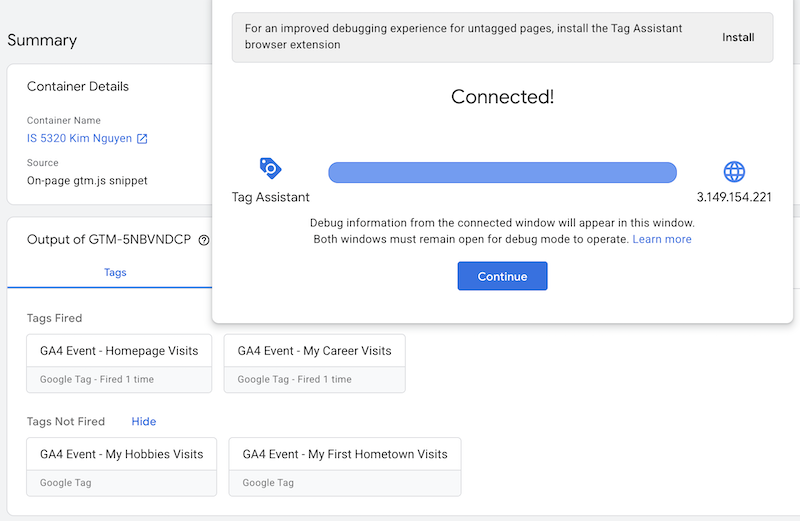
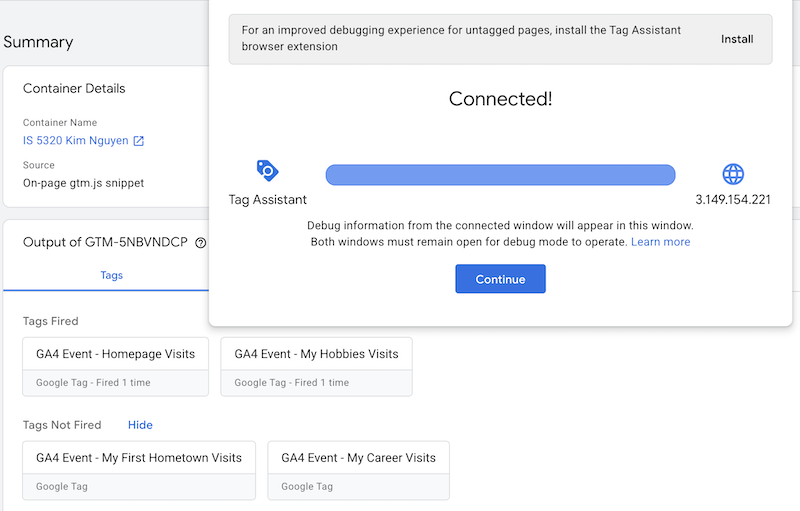
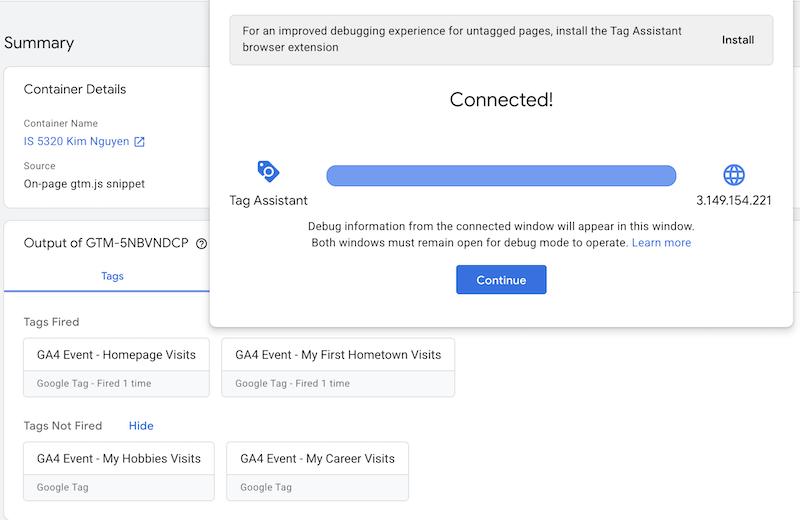
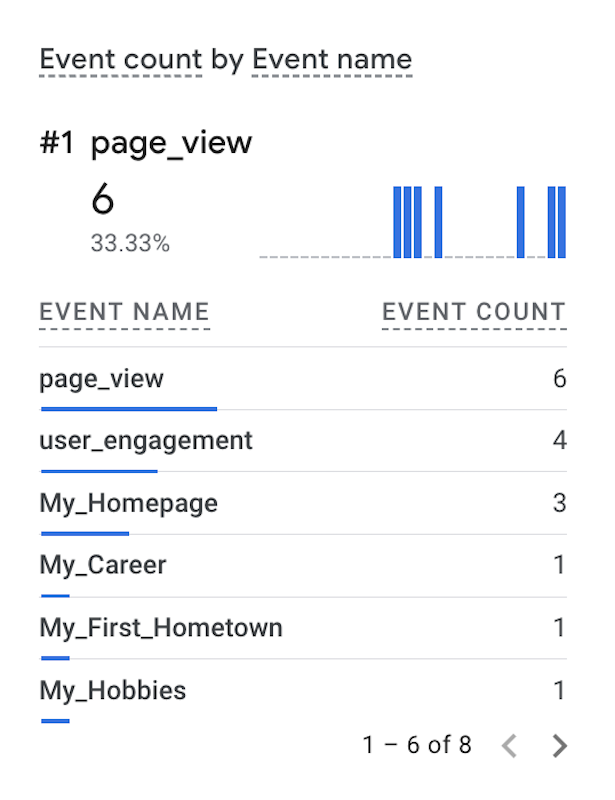
In the Event count by Event name real time report above, I can see that my tags are working and my custom events are being tracked. The URL that contains my homepage IP address was fired 3 times, and each of my posts was fired one time.
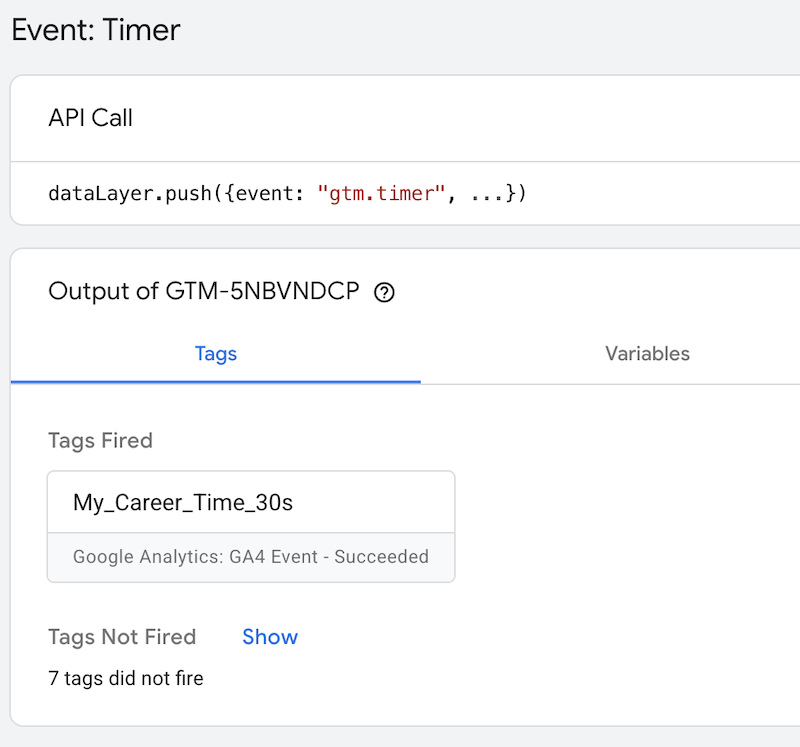
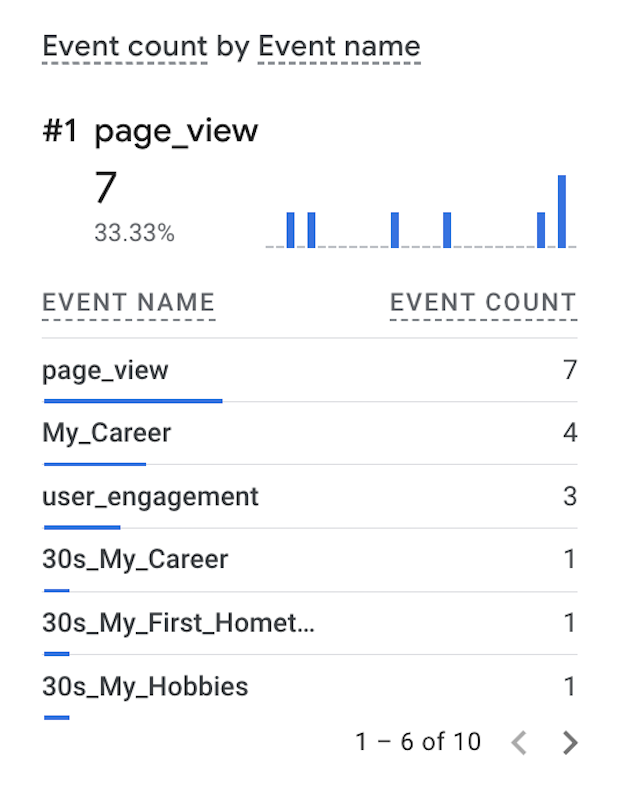
Since my website is not built for e-commerce, the only metrics that I care about are page view count and time spent per event. Thus, I created timer triggers for some of my posts. As seen from the images below, I have a tag fired when the user spend 30 seconds on viewing My Career page. These timer events can been seen from Event Count by Event Name real time report as well. I can also create timer triggers for 60 seconds or longer intervals to measure user engagement.
Essay III: Find and describe one of best use cases using custom events in GA4 (one paragraph)
GA4 custom events are used for tracking a specific user interaction that do not meet the standard definition for event tracking within GA4 standard setup[1]. Some example of custom events are when a user submit a form, sign up for newsletter, or download a file from the website. The use of GA4 custom events enable tailored data tracking and enhanced user insights to help web owners improve marketing strategy[2].
One of the best use cases of GA4 custom event is when someone add an item to a wishlist in their account[3]. This is an important metric for ecommerce website because it allows the site owner to gain insight on what items are popular and have high sell potential. The site owner can rely on this metric to run ads on the users’ web browser as well as on their different platforms across multiple devices to promote the item and remind the users to complete the purchase. The owner can also set price discount or create a coupon as a marketing strategy, making the item more affordable to shoppers.
References
- [1] Fleming, Haydn. “GA4 Custom Events Best Practices.” Glossary By 2Point, 15 Nov. 2025, www.2pointagency.com/glossary/ga4-custom-events-best-practices/.
- [2] Puentes, Alexis. “GA4 Custom Event Guide & Strategy.” Nimble Gravity, 17 Nov. 2023, nimblegravity.com/blog/ga4-custom-event-guide-strategy.
- [3] Vanhee, David. “Custom Events in Google Analytics 4 – the Beginner’s Guide.” MeasureU, 19 Feb. 2026, measureu.com/custom-events-google-analytics-4/.
Leave a Reply