Author: knguyen

  • Estate Planning Tools

    Image from Essential Estate Planning Tools

    What is Estate Planning?

    Estate planning is the process of arranging how your assets will be managed and distributed to beneficiaries after death.
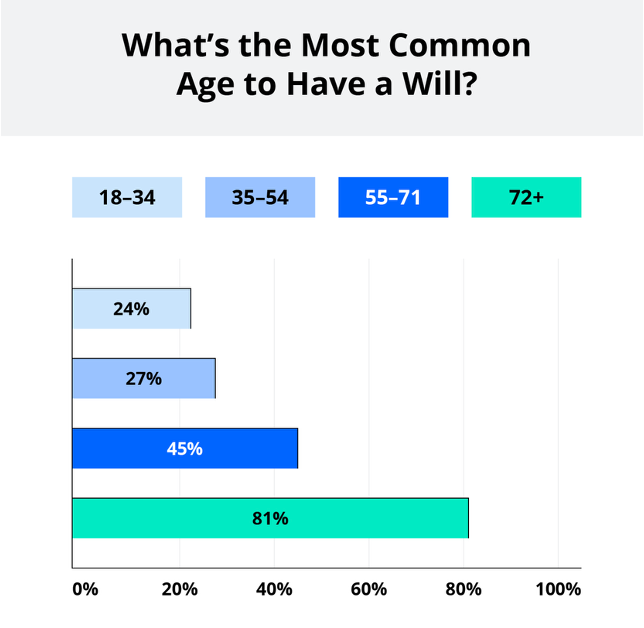
    Source: https://www.legalzoom.com/

    Will and Educational Factors

    Source: https://www.legalzoom.com/
    Source: https://www.legalzoom.com/
    Source: https://www.legalzoom.com/
    Source: https://www.legalzoom.com/

    FreeWill

    Freewill is a free online estate planning tool that allows users to create a simple will in under 30 minutes. The Freewill website requires the user to sign up for a free account to get started. It has a very user-friendly dashboard that takes the user through a series of questions from start to finish. In the first article, Declarations, the user is asked to provide basic information such as marital status, dependents and approximate value of assets. In this section, the user is also able to define how the assets will be distributed among beneficiaries and declare if he/she wishes to donate any gift to charity. The second article, Executor Provisions, takes the user through identifying the executors (the persons appointed to manage a deceased person’s estate). The user can choose to have a no-contest clause, a provision stating that a beneficiary that challenges the validity of the will in court will be risking their part of the inheritance if they fail to win the trial. This clause is designed to maintain family harmony and ensure that the assets is distributed according to the deceased person’s intent. The user can also choose to add a self-proving affidavit, a separate document attached to the will as a testament that the will has been signed and witnessed in front of a notary public.

    After going through all the questions and provide the necessary information, the user can review and download a copy of their will free of charge. The will needs to be signed in front of a notary public to become legally valid. The testator, creator of the will needs to store the will in a safe location and inform the executors of the location so that it can be found after death. In addition, the Freewill.com website also offer tool to create other types of documents such as Advanced Healthcare Directive (a document that outlines medical treatment preferences if a person is unable to make decision due to illness), Financial Power of Attorney (a document that appoints someone else to make financial design if the person is unable to) and Beneficiary Designation (document that distributes assets not covered in will or other documents).

    The FreeWill online tool is ideal for simple cases where the person does not have a lot assets but it lacks the ability to handle complex estates. The tool cannot provide personalized advice and the legal support that user would be able to get from an attorney. There is limited customization available and the form is designed to be one size fit all. The site makes money by asking the users if they wish to donate to charity and that is how it is able to offer its service for free. Thus, the users need to be cautious and avoid making any unintended decision. It is best to consult an attorney in cases of substantial assets involving businesses, and complex family structure.

    LawDepot

    LawDepot is another online estate planning tool that allows the users to DIY last will and testament document. Similar to FreeWill, to create a will, the users need to go through a series of questions where they are asked to identify executors and beneficiaries. However, this tool does not offer free download of the document and requires the users to sign up for an online subscription costing between $9 to $13 per month. Individual documents can also be purchased at a cost between $8 to $119 depending on complexity. There is a one-week free trial that the users can take advantage of if they are just starting out and want to get a quick free experience with estate planning. With subscription, the user can get access of many different types of documents including Power of Attorney, Gift Deed, Revocable Living Trust (a legal document that outline assets distribution to beneficiaries similar to a will but allow assets to bypass probate) and many more. Aside from estate planning, the LawDepot website also offer real estate forms such as lease agreement and quitclaim deed, as well as business plan and contract. The tool offers more customization options compare to FreeWill with a wide range of documents available. These forms are good for simple cases but again might not be suited for large complex assets. There is no legal advice or support from professional. The user can choose to contact a lawyer or attorney for additional support through LawDepot online website, but this service is not included as part of the subscription.

    Rocket Lawyer

    Rocket Lawyer is an online website that also offers tool for DIY will but requires a subscription. There is a free trial available for 7 days similar to LawDepot. After the free trial period, the user has the options to pay a monthly subscription of $39.99 to or $239.88 for an annual subscription which can be paid in 4 installments throughout the year. The users can fill out the last will and testament template by answering a series of questions similar to the previous tools discussed above. One interesting feature in this will template that is not offered in the previous tools is that the users are asked if they want to purchase an executor bond (a court requirement for the person appointed to manage the deceased person’s assets to purchase a surety bond, an insurance protecting beneficiaries from executor fraud) and if they would like for the executor to receive compensation for serving. There are also specific questions regarding the executor personal liability in performing the duty and if the executor is allowed handle disputes between beneficiaries. Similar to other online estate planning tools, Rocket Lawer offers convenience and speed for individual with simple assets. There is a variety to documents available for different legal needs. With DIY tools, there is always a risk of error if the user is not at all familiar with the terms used in estate planning. Personalized advice or professional support is not included in the standard subscription, and the user will be charged additional fees for the special service.

    Risks of Using Online Estate Planning Tools

    Online will-making tools do not offer tailored advice for different situations, and the user is responsible for understanding the terms and provisions and providing accurate information of their assets. The document is not reviewed by a professional and thus any error made by the user can lead to legal dispute and high long-term cost. The asset distribution might not be optimized for tax planning. Estate planning requires more than just simply creating a will or a document. The user needs to have an understanding of the legal processes (such as probate) involved and the timeline for when and how the assets will be distributed. This is important information that are not well explained on these online platforms. Online platforms have standard templates that are designed to be one size fit all. These templates might not be valid for all due to different state laws. Online tools will not be able to guide users through updating their will for major life changes such as getting married or divorced or loss of a beneficiary.
    Click on links below to try out these estate planning tools

    FreeWill

    LawDepot

    Rocket Lawyer

  • Composite Layup Manufacturing

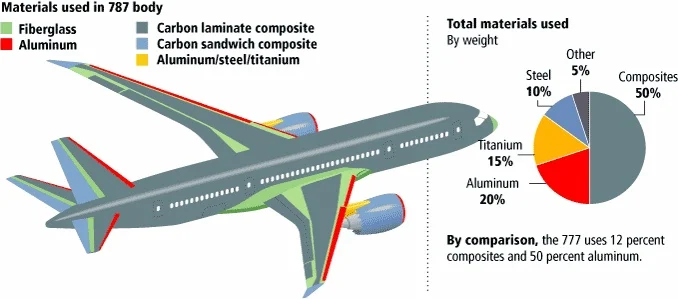
    In the past week, I had an opportunity to take part in a hands-on training session at work where I learned about the manufacturing process of composite panels. Composite is a man-made material created by combining two or more different materials of different mechanical and chemical properties, typically reinforced carbon fiber combined with resin. Carbon fiber is a fabric like material with high-strength and high flexibility whereas resin is a liquid plastic that is cured to hold the fibers in place. Composites are widely used in aircraft bodies as well as wing structure due to its light-weight and durability.

    Image from Appropedia, Composites in the Aircraft Industry

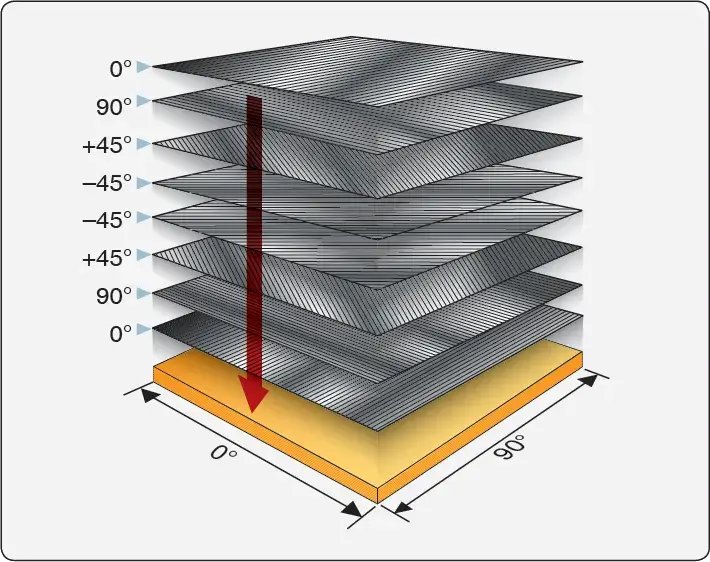
    Composite layup is a manufacturing process involves stacking up carbon fiber layers, typically in a mixed of different fiber orientations (0o, 45o, 90o, -45o), form into shape using mold and then seal in an air-tight vacuum-bag using atmospheric pressure to compress the layers together. The sealed bag is then cured in an oven with heat and pressure to transform it into high-performance engineered material. The layup process is done manually and is very time consuming and requires high level of skill and precision.

    Because composite is a man-made material, the manufacturing process if not done in a controlled environment can produce many different defects. The orientation of the fiber is very important in determining the strength of the final part. Human errors such as placing a layer in the wrong orientation or simply leaving out a layer can reduce the strength of the material. Other types of defects such as having a bag leak can result in air gaps in between the layers leading to delamination. The forming process can also produce wrinkles in the panel. Foreign objects can get in between the layers, leading to having too much resin or too much void in some areas of the panel after the curing process. These types of defects produce inconsistent mechanical properties and reduce the fatigue strength of composites. Defects are accounted for in engineering analysis to ensure that the part can withstand its ultimate load case.

    Composite manufacturing is a labor intensive manual process and can expose workers to toxic chemicals. Raw material typically costs over $36 per pound, adding to its high production cost. Large aerospace companies typically try to offset the cost by outsourcing the work to smaller and international suppliers for cheap labor.

    Weight is a critical factor in determining the performance and operational cost of an aircraft. Therefore, composite materials, though expensive to manufacture, still has an advantage over steel or aluminum due to it being incredibly light weight in comparison.

  • My Spring Break Plan

    I was planning for an upcoming spring break trip to Japan when I came across a video about staying in Kinosaki Onsen and decided to add it to my itinerary. Kinosaki Onsen is a 1300 year-old traditional hot-spring town in Toyooka, Hyōgo Prefecture, about 3 hours train ride from Osaka. The town is known for the seven public hot-springs, all tattoo-friendly, where visitors can enjoy bath-hopping and strolling through the town in yukata (traditional bathrobe) and geta (traditional wooden clogs).

    Image from Visit Kinosaki, “Strolling the Town in Yukata”

    Scenery

    The town offers a picturesque willow-lined canal with a tranquil, old-world feel, especially at night. In the spring, cherry blossoms can be found in the quiet path of Kiyamachi street along the Otani River, illuminated by pink lanterns in the evening offering a romantic and scenic stroll.

    Image from Japan Food Guide, “Cherry Blossoms in Kinosaki Onsen: Enjoying the Breathtaking Spring Scenery in the Onsen Town”
    Image from Visit Kinosaki, “Hot Springs and Cherry Blossoms”

    Ryokan Stay

    The town operates with the concept of one big ryokan (traditional Japanese inn), an interconnected inn where streets act as hallways, hotels as guest rooms and the seven onsens as communal baths, creating a seamless immersive experience for visitors. All traditional inns in town offer free passes for hotel guests to visit the seven public onsens.

    Image from TripAdvisor, Kinosaki Onsen Nishimuraya Honkan

    Local Cuisine

    Kinosaki Onsen is most famous for Matsuba crab (snow crab) and high quality Tajima beef (the precursor to Kobe beef). All ryokan (inn) in town offers kaiseki dinner, which is a traditional multi-course meal featuring the best seasonal local ingredients.

    Image from Visit Kinosaki

    Kinosaki Ropeway

    Aside from soaking in the hot-spring water and enjoy local cuisine, visitors can hike or take the cable car to the summit of Mt. Daishi for panoramic views of the town and the Sea of Japan. The ropeway provides access to the historic Onsenji Temple. It was a well known rule (but no longer kept) that visitors to Kinosaki Onsen must travel up to the mountain to the Onsenji Temple, pray for permission and learn the proper way to enter the hot-spring.

    Image from Visit Kinosaki, Ropeway

    Kinosaki onsen is becoming increasingly popular to international tourists in recent years but still remains much less crowded compared to other hot-spring towns due to its distance from major cities. It is possible to do a day trip to Kinosaki Onsen from Osaka or Kyoto but it is best to stay at least a couple nights to relax and allow time to fully explore the town.

  • HW8 Summary

    Time Log Teams – time spent on other Teams’ sites (must have 3 entries or more):
    Date: Feb. 27, 2026 From: 08:45am To: 09:00am
    Date: Feb. 27, 2026 From: 11:30pm To 11:45pm
    Date: Feb. 29, 2026 From: 11:15pm – 12:00pm
    Date: Mar. 1, 2026 From: 02:00pm – 02:30pm

    Time Log Students
    – time spent on other students’ sites (must have 3 entries or more):
    Date: Feb 23, 2026 From: 08:00pm To: 09:30pm
    Date: Feb. 24, 2026 From: 10:00pm To: 10:30pm
    Date: Feb. 26, 2026 From: 09:30pm To: 10:00pm
    Date: Feb. 27-28, 2026 From: 11:45pm To: 12:15am

    Essay I. Summary of your activities in your contents including new contents created (one paragraph). Provide all the hyperlinks (clickable) of new contents you have created this week.

    I add two new posts this week. One post is titled My Spring Break Plan where I shared some information on a hot-spring town that I’m planning to visit during the upcoming spring break. This post is added to my homepage menu under My Life category. Another post that I added is titled Composite Layup Manufacturing. This post is an introduction to aircraft composite material where I shared what I learned during my training at work. This post is added under My Learning category. I kept my tag cloud updated by adding new relevant tags to each post. I also kept track to visitors’ comments and provide response whenever I can.

    My Spring Break Plan

    Composite Layup Manufacturing

    My Life

    My Learning

    Similar to other homework assignments, I updated my HWs menu to include HW8 with the summary post and the two new posts content.

    HW8

    I also added added a Thank You page to my menu as part of the assignment to implement conversion event.

    Thank you


    Essay II. Summary of your “Thank you” event conversion (add screenshots) (one paragraph)

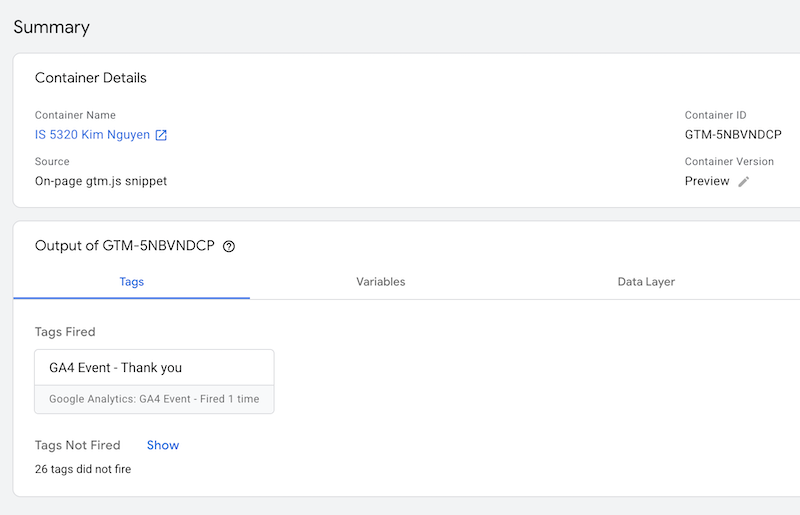
    I created a tag within Google Tag Manager with a trigger to fire the tag whenever someone view the Thank You page. This was done similar to how tags were created in the previous assignment 7. Initially, I tried to create this using a custom event from my GA4 Admin page under Data Display. However, this method seems to not be working correctly and it was not a recommended approach from the article. Below is an image showing the Thank You page tag fired successfully.

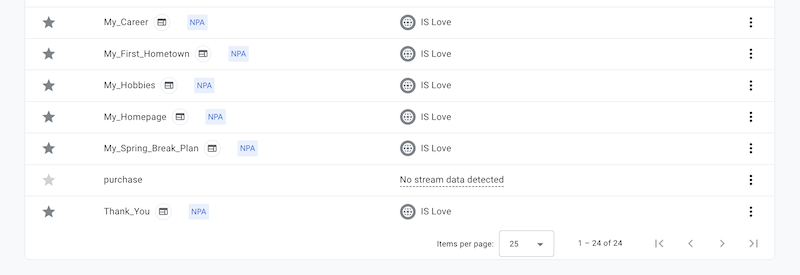
    In GA4 Admin page under Event, I marked the new Thank You event created in Google Tag Manager as a key event to be used for conversion. I also updated the counting method to once per session to avoid inflated data and I gave a default key event value of $1.

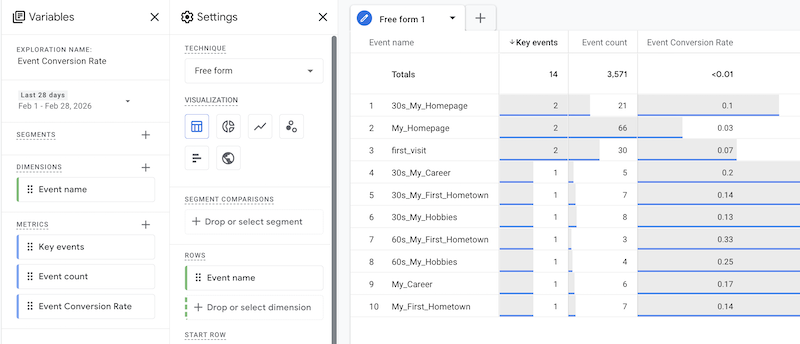
    In GA4 Exploration, I created an Event Conversion Rare report as seen in the image below. Currently, this report does not have data from my Thank You page key event because the event is newly created and marked as key, and it might take about 24-48 hours for data to be collected and reflected in the report. It does however show the conversion rates for some of the events that I created from last week. These events were marked as key a day before so I can see some data. The Event Conversion Rate is a custom metric calculated by taking the number of Key Event divided by Event Count. It can be seen that in the past day or two, I have two first_visit from classmates. The total of first_visit on my page is 30 and the Event Conversion Rate for this key event is 7%.


    Essay III. Summary of your “menu click” event conversion (add screenshots) (one paragraph)

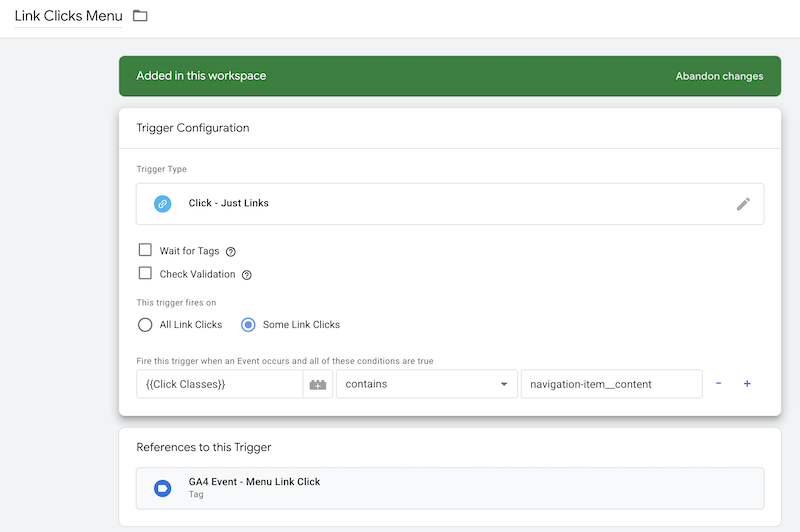
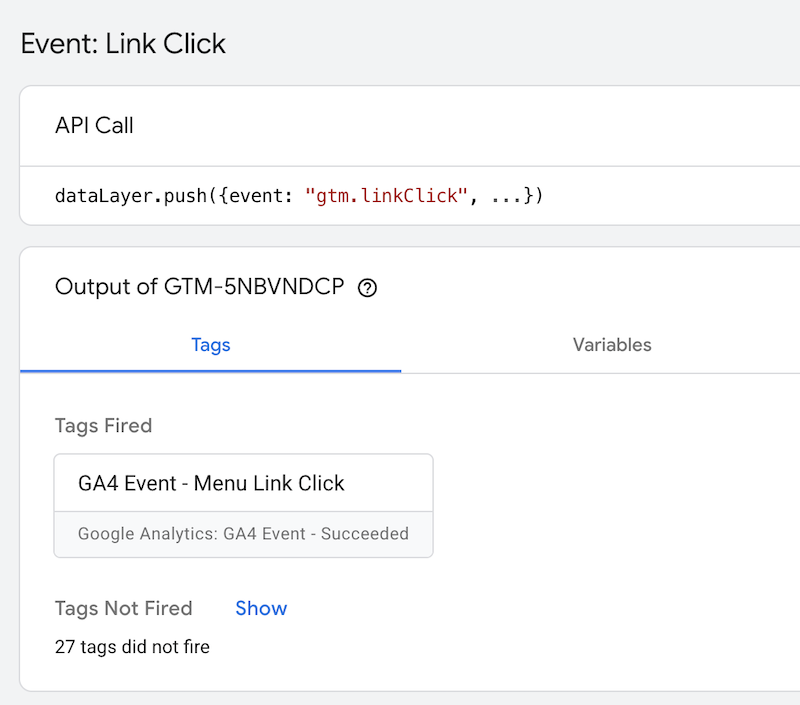
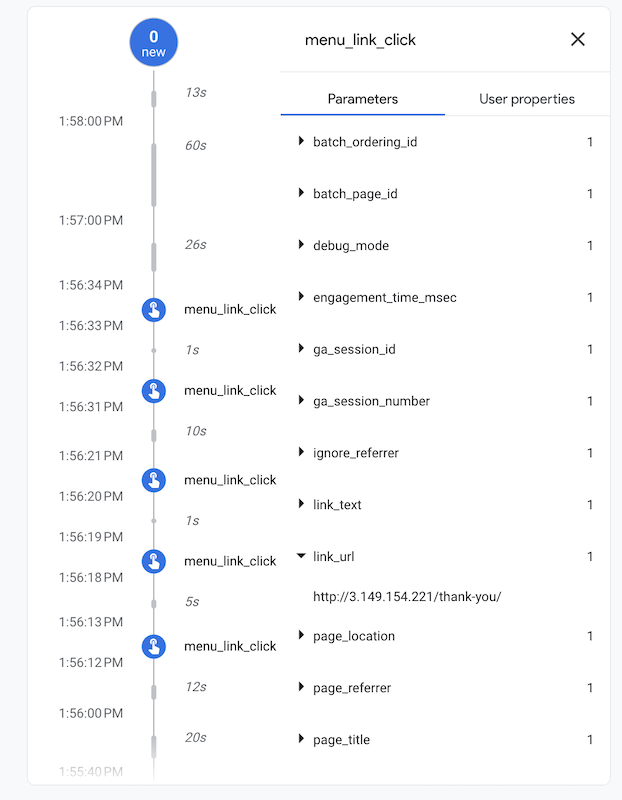
    I created a new tag in Google Tag Manager with a Menu Click Trigger when a user clicks on my navigation menu (click classes contain nativation-item_content). I also checked that this tag fired successfully. Link text and link url were added as event parameters and can be seen in debug view under data display. These activities are captured in the images below.

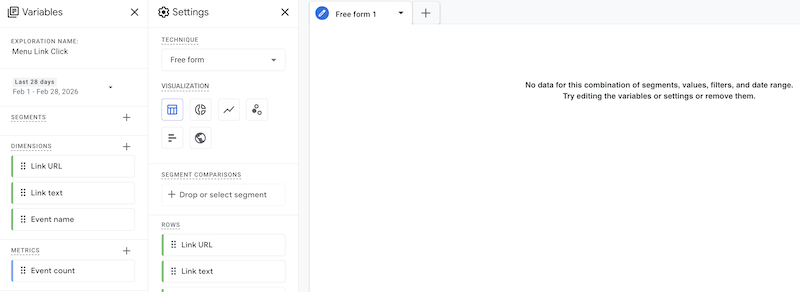
    I created a customer report called Menu Link Clicks under Explorations to see how many clicks each of my menu item gets. Currently, there’s no data to display yet because there is a bit of a delay between 24-48 hours after the event is marked as key for the data to be collected and imported. This report will provide powerful insight into what categories the users are most interested in to help me build future content and improve my menu navigation design.

  • HW7 Summary

    Time Log – time spent on other students’ sites:

    Date: Feb 18, 2026, From 7:30pm to 9:00 pm

    Date: Feb. 19, 2026, From 8:15pm to 8:45pm

    Date: Feb. 20, 2026, From 8:30pm to 10:00pm

    Date: Feb. 21, 2026, From 6:00pm to 6:45pm

    Date: Feb. 22, 2026, From 1:00am to 1:30am

    Essay I: Summary of your activities in your contents including new contents created (one paragraph). Provide all the hyperlinks (clickable) of new contents you have created this week.

    I added two new posts this week.

    The first post is called “My First Hometown” where I wrote about the city where I was born and grew up before moving to Seattle. This post is added to the My Life category in my homepage and is accessible from the navigation menu as well as from the My Life page.

    My First Hometown

    My Life

    The second post is a continuation of what I learned in my personal financial planning class where I shared a few free financial planning tools that I was able to research and explore over the past week. I created a new category called “Financial Planning” and reorganized the post I created last week on compound interest into this new category. I updated the previously created My Learning page and titled it Financial Planning and I now have two posts under this new category. I also created a new My Learning page and have the posts listed by category. I currently have one post listed in this page.

    Free Financial Planning Tools

    Financial Planning

    My Learning

    I recently learned about “Sticky Posts”, which are posts that are pin to the top of the page. From GA4 analysis and commenting activities that other classmates leave on my website, I noticed that some of the more popular posts are My Hobbies and My Career. Thus, I make these two posts sticky posts along with the new My First Hometown post. These three posts will appear on the top of my homepage blog regardless of published date. Other posts will appear in chronological order based on published date.

    Homepage

    For this week assignment, I added the HW7 page as a submenu under HWs page with all the links to the new posts created for this assignment.

    HW7

    HW7 Summary

    Essay II: Summary of your “Event” in GA4 (add a screenshot) (one paragraph)

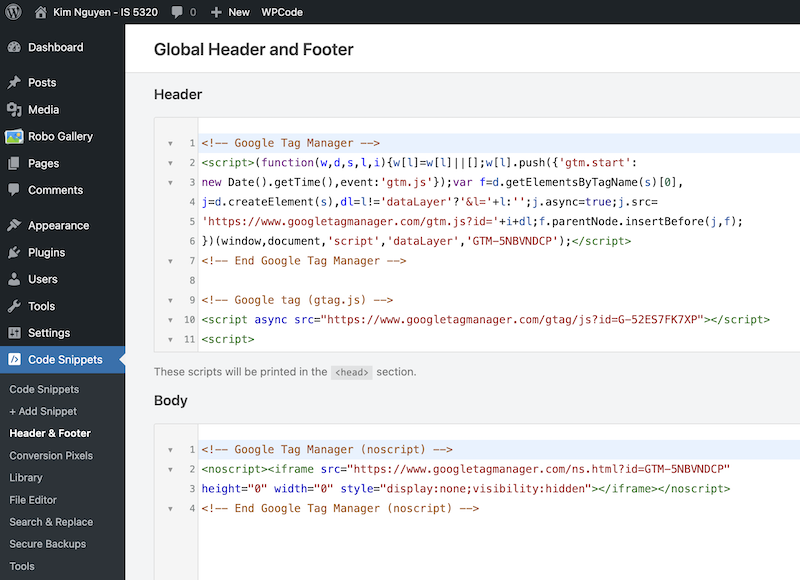
    I created a Google Tag Manager account and added the Container Snippet codes into the header and body of my website.

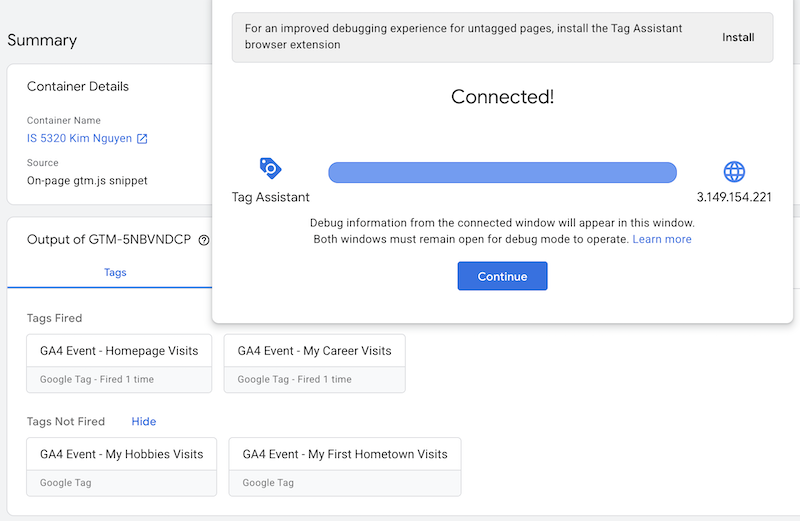
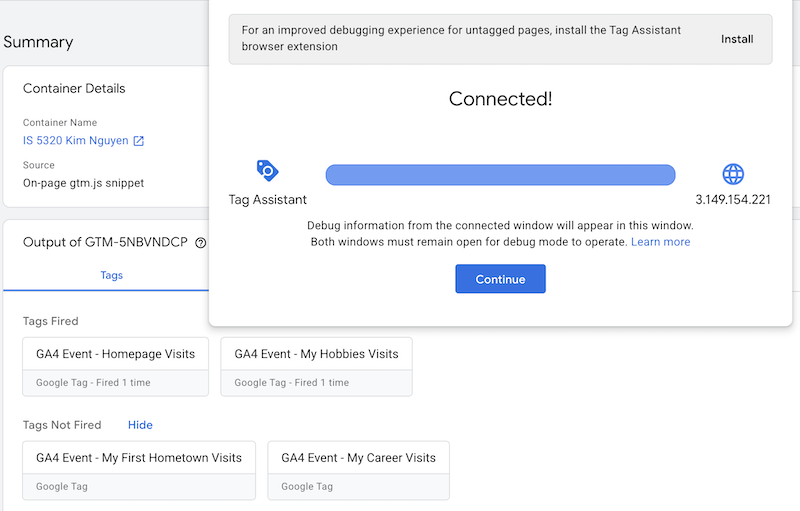
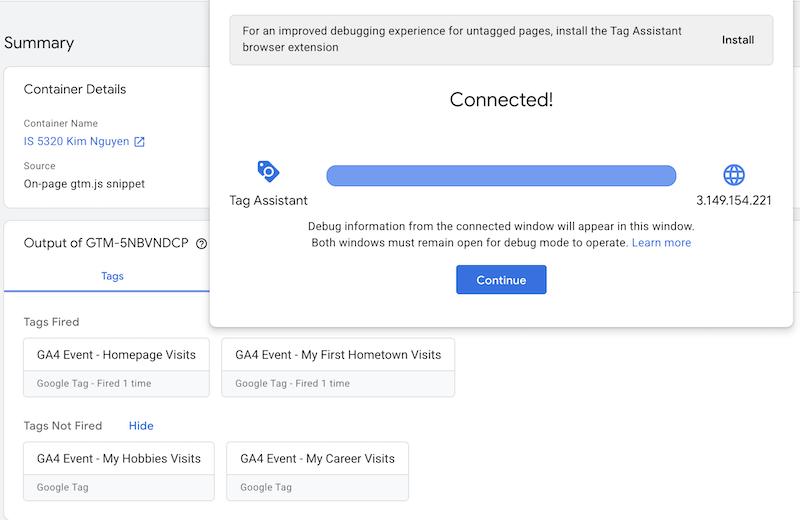
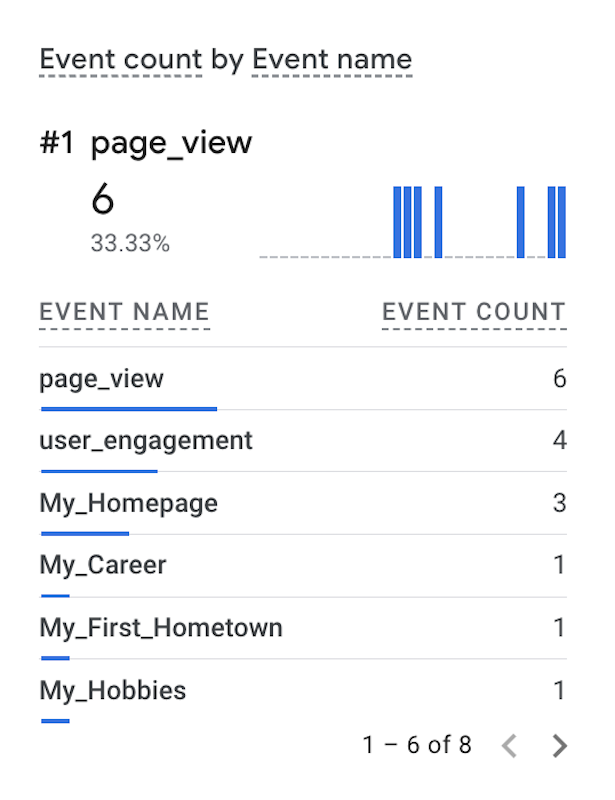
    I created four tags, one for my home page and three others for the more popular posts on my website including My Career, My Hobbies and My First Hometown. I have also tested that all of my tags fired successfully as seen from the images below. These page views are counted under Event Count by Event Name in my GA4 account Realtime report.

    In the Event count by Event name real time report above, I can see that my tags are working and my custom events are being tracked. The URL that contains my homepage IP address was fired 3 times, and each of my posts was fired one time.

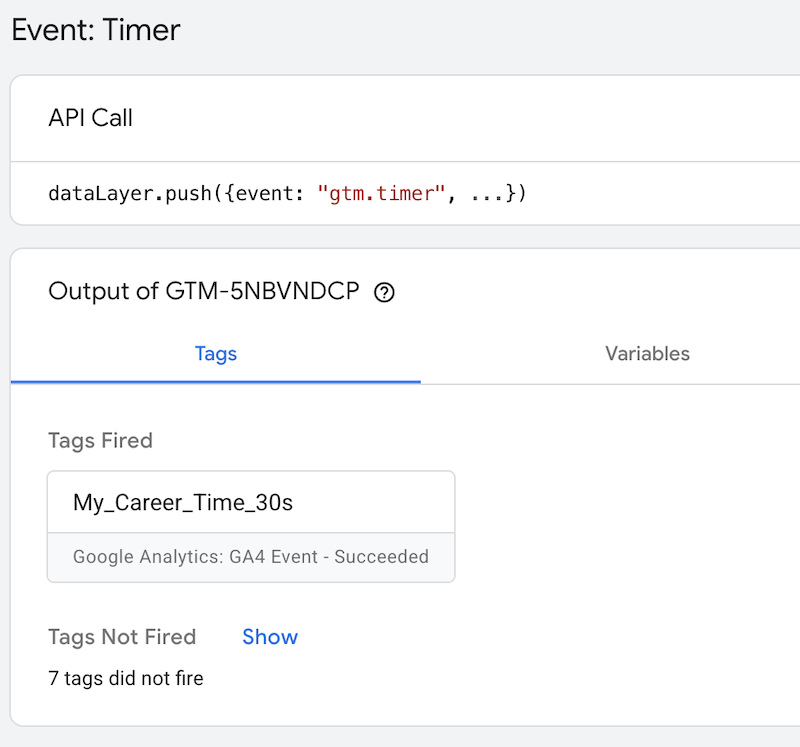
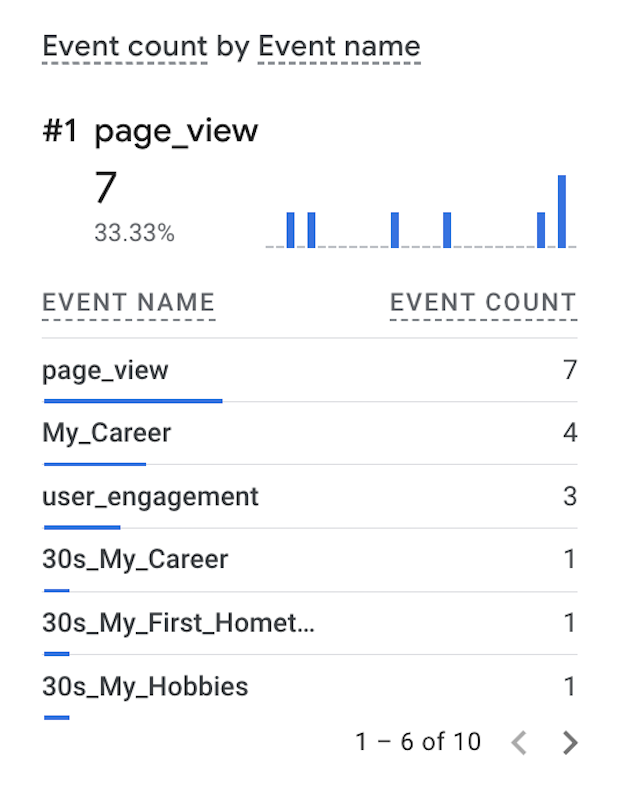
    Since my website is not built for e-commerce, the only metrics that I care about are page view count and time spent per event. Thus, I created timer triggers for some of my posts. As seen from the images below, I have a tag fired when the user spend 30 seconds on viewing My Career page. These timer events can been seen from Event Count by Event Name real time report as well. I can also create timer triggers for 60 seconds or longer intervals to measure user engagement.

    Essay III: Find and describe one of best use cases using custom events in GA4 (one paragraph)

    GA4 custom events are used for tracking a specific user interaction that do not meet the standard definition for event tracking within GA4 standard setup. Some example of custom events are when a user submit a form, sign up for newsletter, or download a file from the website. The use of GA4 custom events enable tailored data tracking and enhanced user insights to help web owners improve marketing strategy.

    One of the best use cases of GA4 custom event is when someone add an item to a wishlist in their account. This is an important metric for ecommerce website because it allows the site owner to gain insight on what items are popular and have high sell potential. The site owner can rely on this metric to run ads on the users’ web browser as well as on their different platforms across multiple devices to promote the item and remind the users to complete the purchase. The owner can also set price discount or create a coupon as a marketing strategy, making the item more affordable to shoppers.

    References