Category: IS 5320 Assignment 7

  • HW7 Summary

    Time Log – time spent on other students’ sites:

    Date: Feb 18, 2026, From 7:30pm to 9:00 pm

    Date: Feb. 19, 2026, From 8:15pm to 8:45pm

    Date: Feb. 20, 2026, From 8:30pm to 10:00pm

    Date: Feb. 21, 2026, From 6:00pm to 6:45pm

    Date: Feb. 22, 2026, From 1:00am to 1:30am

    Essay I: Summary of your activities in your contents including new contents created (one paragraph). Provide all the hyperlinks (clickable) of new contents you have created this week.

    I added two new posts this week.

    The first post is called “My First Hometown” where I wrote about the city where I was born and grew up before moving to Seattle. This post is added to the My Life category in my homepage and is accessible from the navigation menu as well as from the My Life page.

    My First Hometown

    My Life

    The second post is a continuation of what I learned in my personal financial planning class where I shared a few free financial planning tools that I was able to research and explore over the past week. I created a new category called “Financial Planning” and reorganized the post I created last week on compound interest into this new category. I updated the previously created My Learning page and titled it Financial Planning and I now have two posts under this new category. I also created a new My Learning page and have the posts listed by category. I currently have one post listed in this page.

    Free Financial Planning Tools

    Financial Planning

    My Learning

    I recently learned about “Sticky Posts”, which are posts that are pin to the top of the page. From GA4 analysis and commenting activities that other classmates leave on my website, I noticed that some of the more popular posts are My Hobbies and My Career. Thus, I make these two posts sticky posts along with the new My First Hometown post. These three posts will appear on the top of my homepage blog regardless of published date. Other posts will appear in chronological order based on published date.

    Homepage

    For this week assignment, I added the HW7 page as a submenu under HWs page with all the links to the new posts created for this assignment.

    HW7

    HW7 Summary

    Essay II: Summary of your “Event” in GA4 (add a screenshot) (one paragraph)

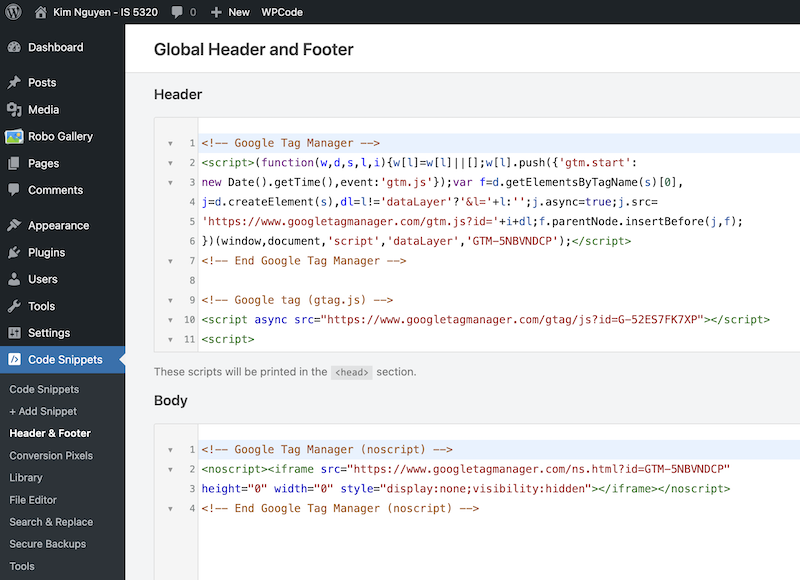
    I created a Google Tag Manager account and added the Container Snippet codes into the header and body of my website.
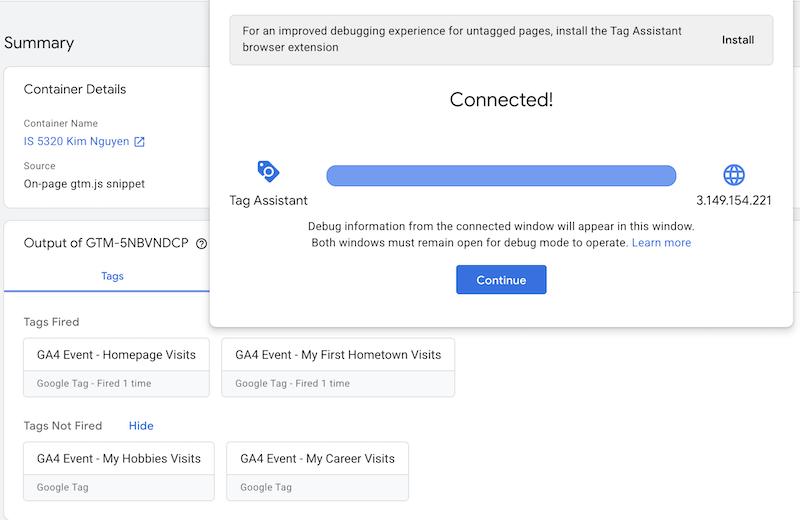
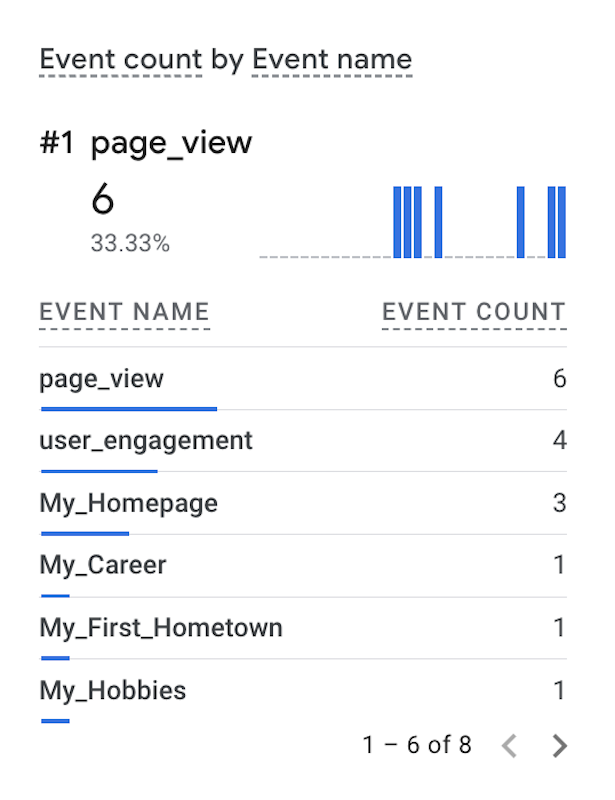
    I created four tags, one for my home page and three others for the more popular posts on my website including My Career, My Hobbies and My First Hometown. I have also tested that all of my tags fired successfully as seen from the images below. These page views are counted under Event Count by Event Name in my GA4 account Realtime report.
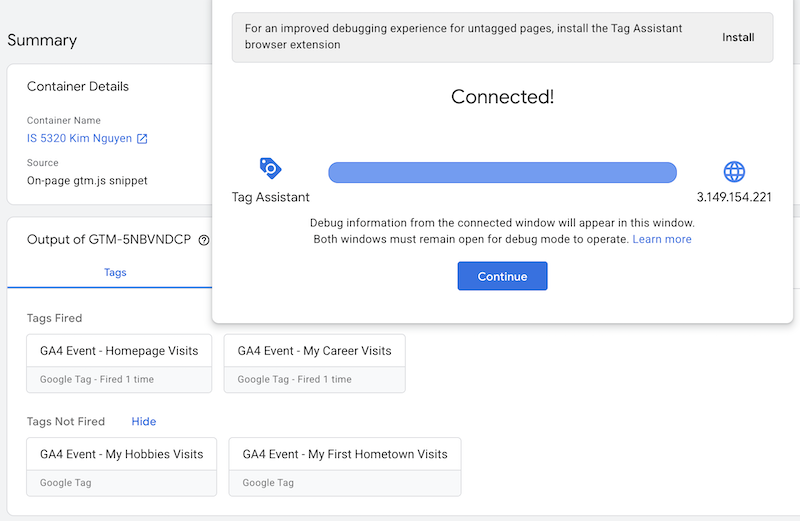
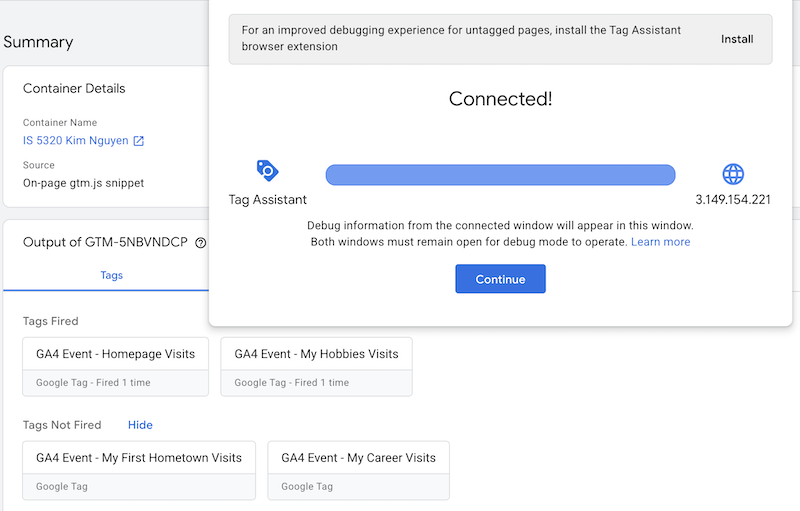
    In the Event count by Event name real time report above, I can see that my tags are working and my custom events are being tracked. The URL that contains my homepage IP address was fired 3 times, and each of my posts was fired one time.

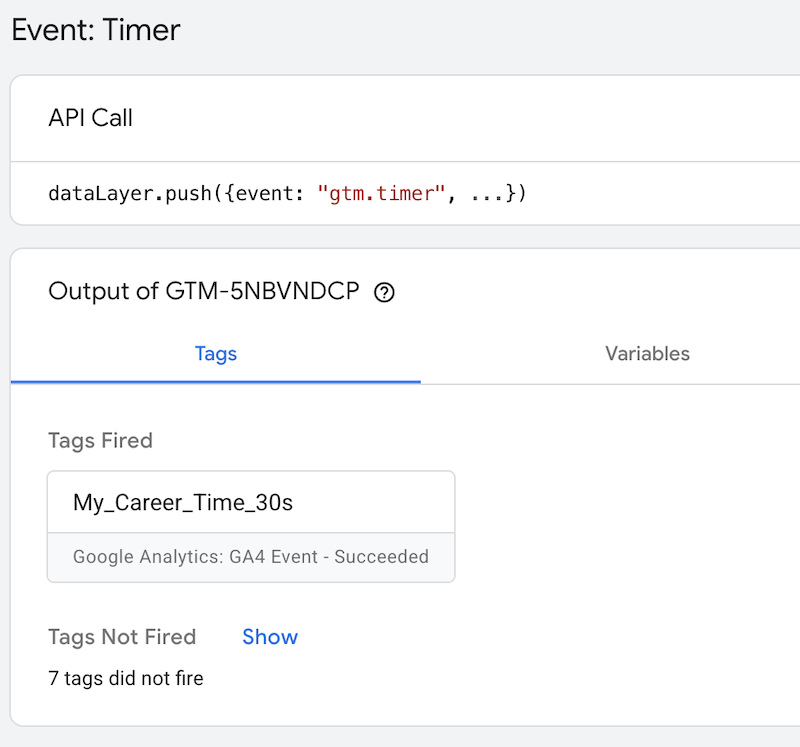
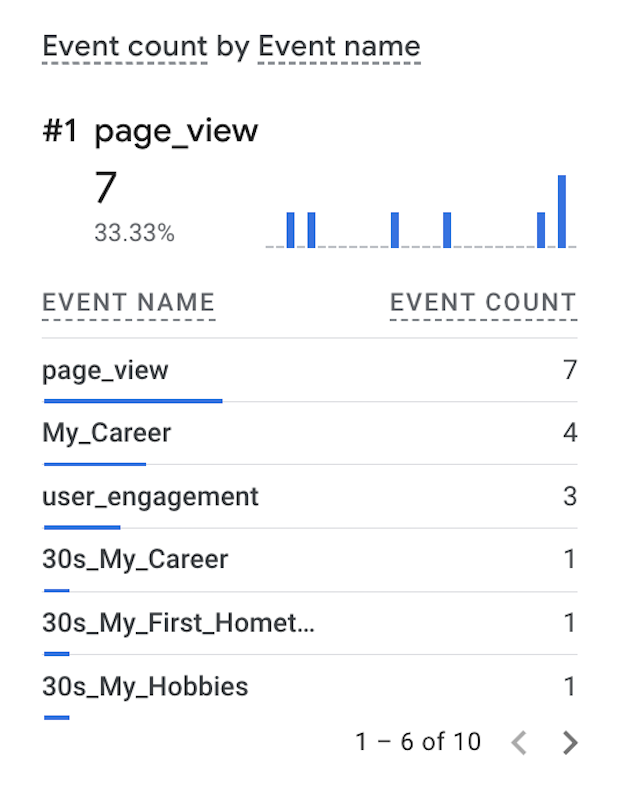
    Since my website is not built for e-commerce, the only metrics that I care about are page view count and time spent per event. Thus, I created timer triggers for some of my posts. As seen from the images below, I have a tag fired when the user spend 30 seconds on viewing My Career page. These timer events can been seen from Event Count by Event Name real time report as well. I can also create timer triggers for 60 seconds or longer intervals to measure user engagement.
    Essay III: Find and describe one of best use cases using custom events in GA4 (one paragraph)

    GA4 custom events are used for tracking a specific user interaction that do not meet the standard definition for event tracking within GA4 standard setup. Some example of custom events are when a user submit a form, sign up for newsletter, or download a file from the website. The use of GA4 custom events enable tailored data tracking and enhanced user insights to help web owners improve marketing strategy.

    One of the best use cases of GA4 custom event is when someone add an item to a wishlist in their account. This is an important metric for ecommerce website because it allows the site owner to gain insight on what items are popular and have high sell potential. The site owner can rely on this metric to run ads on the users’ web browser as well as on their different platforms across multiple devices to promote the item and remind the users to complete the purchase. The owner can also set price discount or create a coupon as a marketing strategy, making the item more affordable to shoppers.

    References

  • My First Hometown

    Image from Vinpearl, “Phan Thiet, Vietnam: A tropical paradise with golden sunshine and dry wind”

    While I’ve lived in Seattle for more than half of my life and I consider the city my second hometown, my first hometown where I was born and raised is Phan Thiet, a coastal city in Southeast Vietnam and the capital city of what used to be Binh Thuan Province before the restructure in 2025.

    Image from Agoda, “Welcome to Phan Thiet: A Journey Through Culture and Serenity”

    Being a coastal city, Phan Thiet is known for fishing villages with vibrant colorful boats and outdoor fish markets where the locals would buy and sell fresh seafood everyday. As a child, I remember days where my family would go to the beach as early as 5am where I and my siblings would go play in the water and the sand while my mom would go shop for seafood. Phan Thiet has a tropical savanna climate, characterized as hot, dry and windy. In contrast to Seattle or the U.S. where people would go to the beach when it’s hot and sunny out, Phan Thiet locals go to the beach early in the morning or late in the afternoon to avoid sun exposure.

    Image from Vinpearl, “Sand dunes in Mui Ne: Best spots for unique desert experiences in Vietnam”

    Phan Thiet is also famous for red and while sand dunes located 25 kilometers from the city center where tourist can enjoy jeep tour riding through the desert or sliding down the sandy hills. It is a perfect destination for photography and capturing the sunset.

    Image from Vietnam Luxury Travel, “Poshanu Cham Towers: A Timeless Symbol of Champa Culture in Phan Thiet”

    The city also offers rich culture and history with famous landmarks such as Poshanu Cham Towers and Ta Cu Mountain & Lying Buddha.

    Poshanu Cham Towers are a symbol of Champa culture influenced by Hinduism and Buddhism. These towers are characterized by ancient red-brick structures built by the Champa Kingdom in the 8th-century to worship Hindu deities.

    Ta Cu Mountain is home to Linh Son Truong Tho Pagoda and the longest Lying Buddha statue in Vietnam. The Lying Buddha statue is surrounded by lush green forest and sacred spiritual atmosphere. Visitors to the mountain and choose to hike, which takes an average between 2-3 hours, or enjoy a 10-minute cable car ride up to the temple.

    Lying Buddha, Image from Du Lich Thanh Pho Ho Chi Minh
    Linh Son Truong Tho Pagoda, Image from Du Lich Thanh Pho Ho Chi Minh

    Phan Thiet is becoming a popular tourist destination in recent years with lots of new resorts being built for private beach experience. I haven’t had a chance to revisit some of these places since moving the States but I would hope the city is able to retain its natural beauty alongside boosting tourism.

  • Free Financial Planning Tools

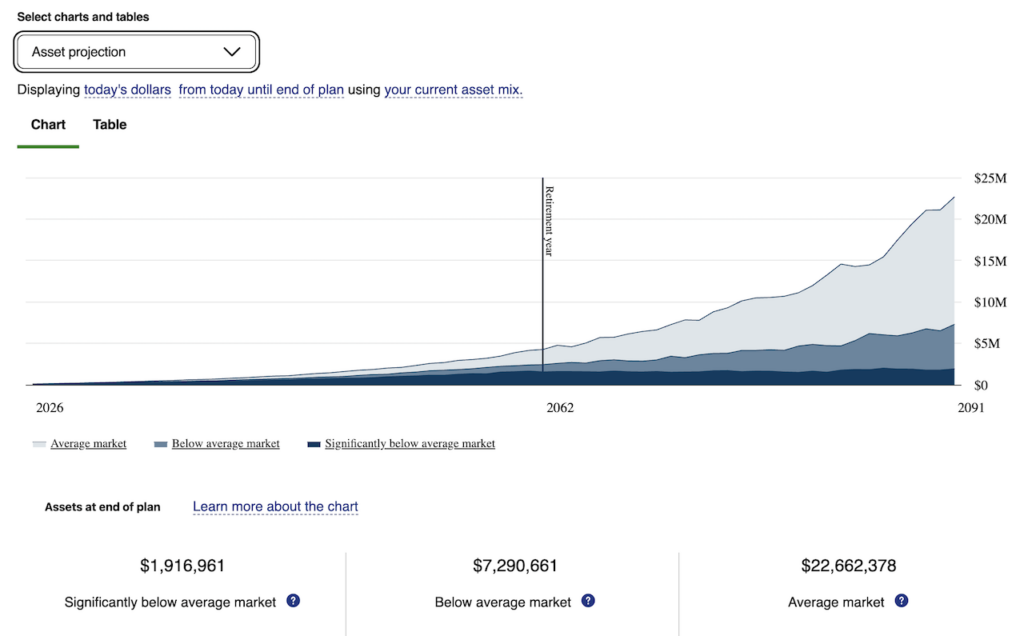
    Fidelity is one of the largest brokerage companies in the world offering financial services including free online financial planning tools. The Fidelity Retirement Planning dashboard allows users to create a personal household profile (income, bonus, commission), retirement profile (retirement age, state, life expectancy), retirement expenses (can use automatic estimate or define user input), current assets (401k, saving, investment, real estate) and retirement income (social security, can use automatic estimate or manual input). The result from the analysis is a basic graph showing projection for 3 different scenarios, average market, below average market and significantly below average market.

    The tool is very simple and easy to use. If the user already has a Fidelity account for 401k or IRA, all of these assets are automatically linked to the tool to be used in the analysis. These types of accounts can also be added manually. The user also has option to manually add in other assets. The analysis result is very easy to interpret and can be viewed with a graph or a table showing the growth of the total assets through each year until the final year of life expectancy.

    Some of the limitations of the tool is that it does not offer different rate of return assumption. Retirement saving rate is set to the user’s current 401k contribution rate and cannot be adjusted easily, which limits the user’s ability to see what happens if they decide to save more or less. It is not clear how the tool takes into account the user’s current expenses and how that factors into their saving plan and retirement projection.

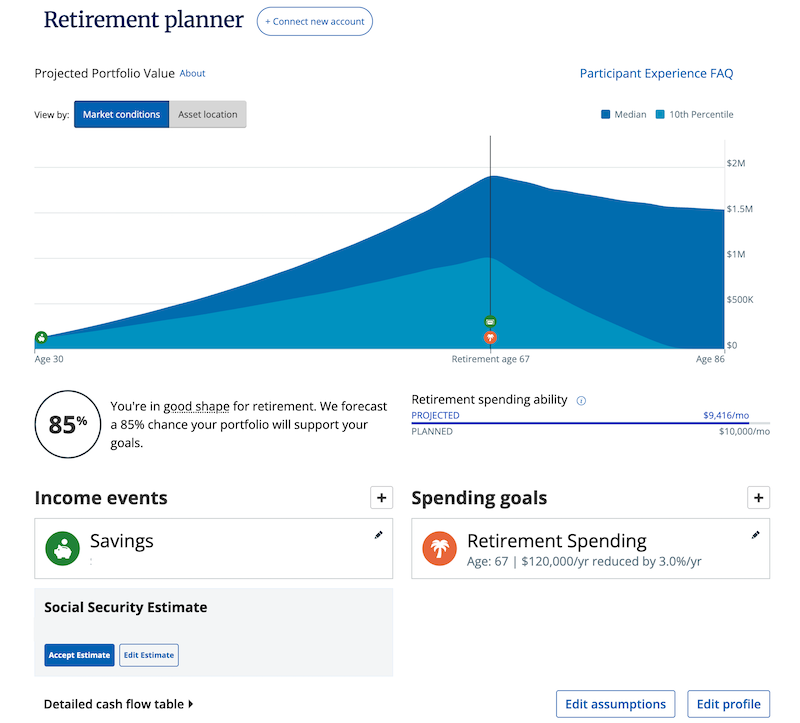
    Empower is another financial services company providing free financial planning tool that allows users to track finances, budgeting and retirement planning. The tool requires setting up an Empower account and link all personal information such as bank accounts, retirement accounts, mortgage, loans, etc. In the retirement planner, the user can input their expected yearly saving, any other cash balance and a percentage of saving increase per year. The user can also adjust retirement age, retirement spending and percentage of spending decrease per year until reaching a spending minimum. There is also a social security estimate provided by the software but can be manually adjusted by the user. There are a few assumptions that the user can manipulate such as effective tax rate, inflation rate and life expectancy. The analysis result shows a graph of the projected portfolio over the projected lifespan with a success rate given in percentage.

    One drawback of the tool is that it requires the user to link personal financial accounts, which might be viewed as a security concern. It also has limited capability in term of making adjustment to saving plan or adding a spouse to the profile. Similar to Fidelity Retirement Planning, this tool assumes a fixed saving rate and does not take into account monthly expenses and how variations might factor into retirement projection.

    On the other hand, one advantage of the tool is that it allows the user to create multiple retirement plans, simulate recession at a certain year during the user’s lifetime, compare these different scenarios and evaluate the rate of success for each plan. Overall, the tool has a very user-friendly interface with an easy learning curve suitable for beginners looking into retirement planning.

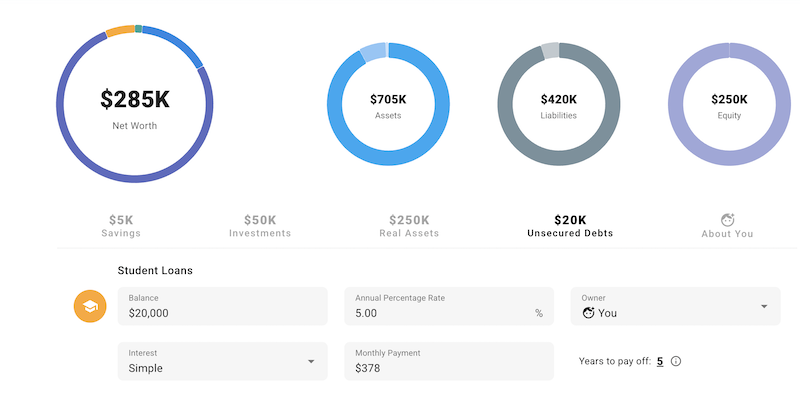
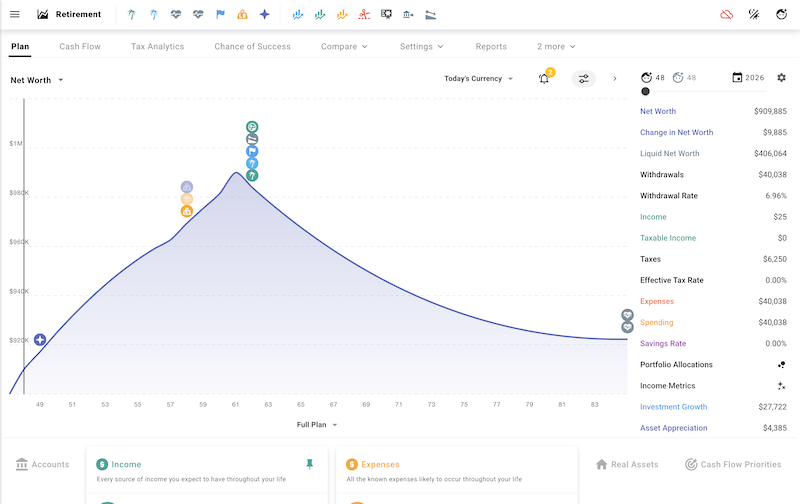
    ProjectionLab Financial Planning tool has a free version as well as premium for advanced users. The free version offers full planning capabilities, but some advanced reporting is limited to premium members only. Aside from the basics, this tool has an option to add life milestones such as getting married, having kids, new jobs or moving to a different place. The user can also input current living expenses and cash flow priorities such as paying debt and mortgage.

    The tool requires the user to manually input all of their information. However, there is no data preservation in the free version, and the user would have to manually input all the numbers again at their next visit. The tool utilizes Monte Carlo probability analysis to simulate the chance of success in reaching retirement goal. A huge drawback of the tool is that it has a high learning curve due to the level of customization and complexity in trying to simulate real life scenarios.

    Fidelity

    Empower

    ProjectionLab