Category: IS 5320 Assignment 9

  • HW9 Summary

    Time Log Teams – time spent on other Teams’ sites (must have 3 entries or more):
    Date: Mar. 2, 2026 From: 08:00pm To: 08:30pm
    Date: Mar. 6, 2026 From: 9:30pm To 10:00pm
    Date: Mar. 7, 2026 From: 6:20pm To: 7:00pm
    Date: Mar. 8, 2026 From: 03:30am To: 04:00am

    Time Log Students
    – time spent on other students’ sites (must have 3 entries or more):
    Date: Mar. 2, 2026 From: 08:30pm To: 09:00pm
    Date: Mar. 6, 2026 From: 10:00pm To: 10:30pm
    Date: Mar. 7, 2026 From: 05:15pm To: 06:20pm
    Date: Mar. 8, 2026 From: 03:00am To: 03:30am

    Essay I. Summary of your activities in your contents including new contents created (one paragraph). Provide all the hyperlinks (clickable) of new contents you have created this week.

    I created two new posts this week, one is titled Estate Planning Tools and the other is titled Geometric Dimensioning and Tolerancing (GD&T). The Estate Planning Tools post is placed under Financial Planning category. This post provides information on some of the estate planning tools that I’ve been researching about, including how to use and the pros and cons of each tool. I also updated the Financial Planning category page to include additional recommended books with links to purchase from Amazon. The second post on GD&T is placed under My Learning category where I continue to share what I’ve been learning at work through various trainings. I added new tags for each post and marked the two new posts as sticky posts on my homepage to increase web traffic. I created the HW9 page where users can access the new contents and homework summary for this week.

    Estate Planning Tools

    Geometric Dimensioning and Tolerancing

    Financial Planning Category

    My Learning Category

    HW9

    Essay II. Summary/analysis of your ‘automatic insights’ (add screenshots) (one paragraph)

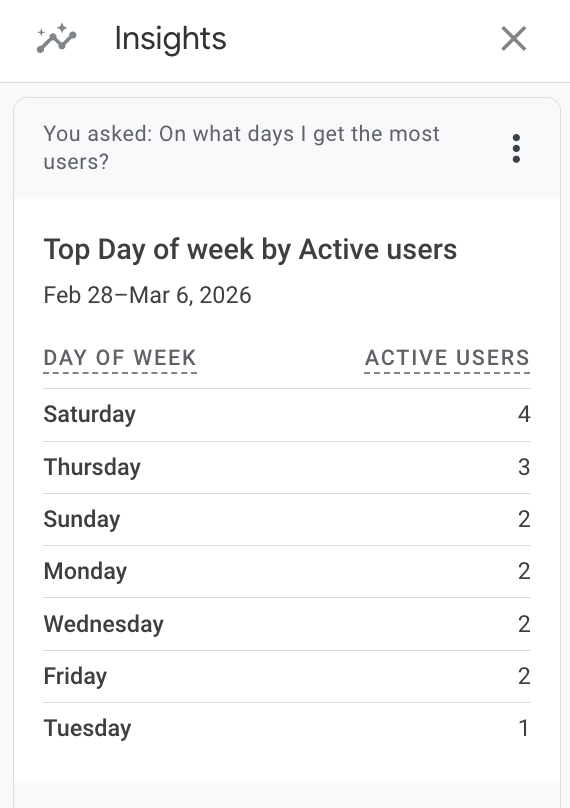
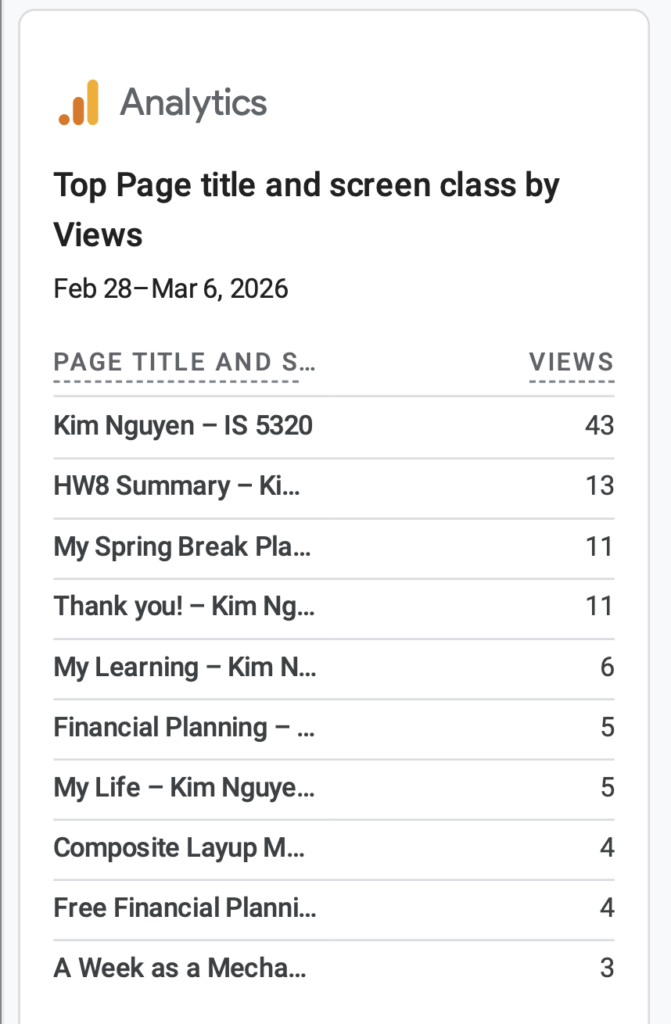
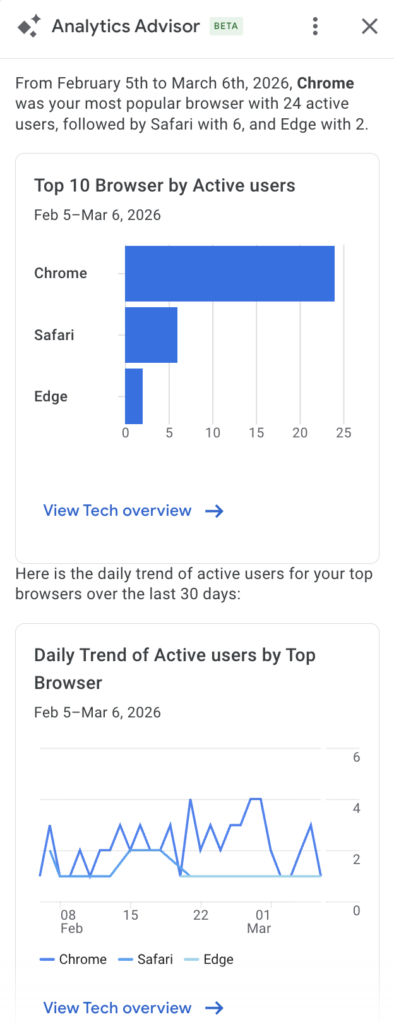
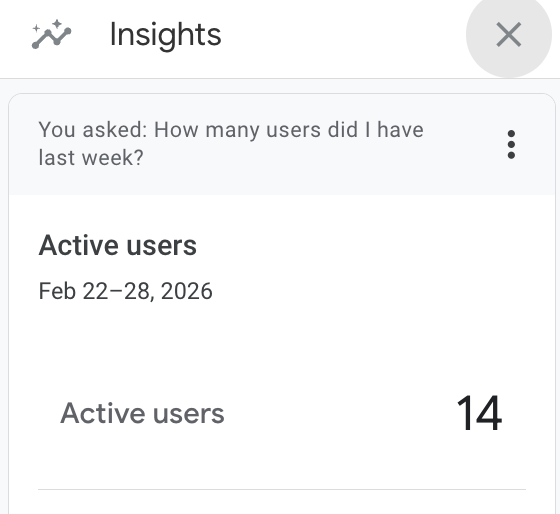
    I’ve tried multiple methods to view automatic insights within my GA4 account. The first method where I tried to access insights from the report menu did not give me any result. This could be due to my site not getting sufficient traffic and not getting sufficient data to generate automatic insights. The second method where I tried to access insights from the small icon at the top right corner of the console allowed me to ask AI suggested questions such as “How many users did I have last week?” and “On what days do I get the most users?”. Over the past week, my site has 14 active users and the day that gets the most traffic is Saturday. I also learned that the most popular post is My Spring Break Plan with 11 views. The Thank You page and HW8 Summary also get a good number of views. I also tried method 3 using the search bar to ask Analytics Advisor. This tool also give me AI suggested questions to ask such as “what are the top 10 browsers by active users?”. I was able to quickly learned that Chrome is the most popular, followed by Safari and Edge.
    Essay III. Summary/analysis of your ‘custom insights’ (add screenshots) (one paragraph)

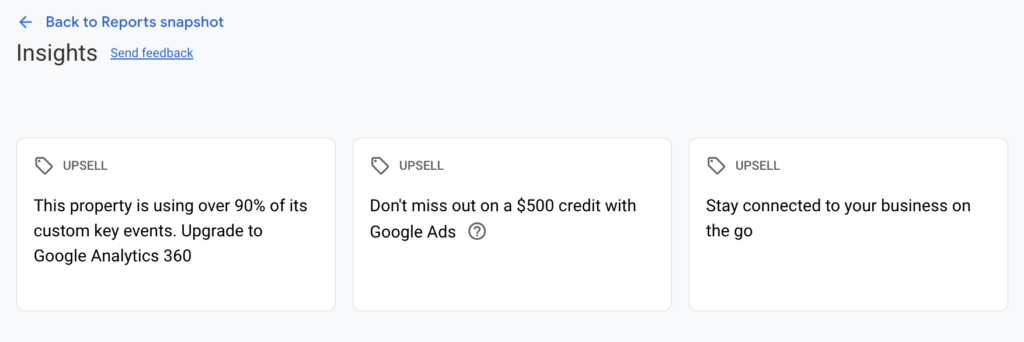
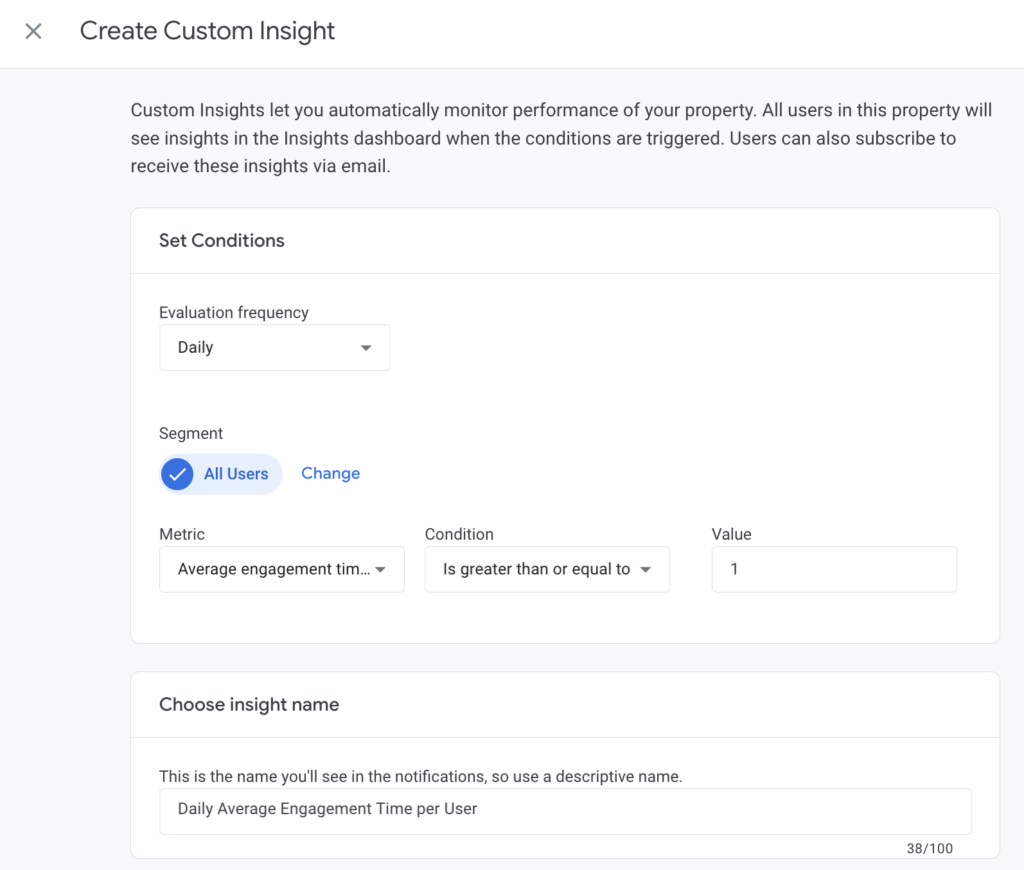
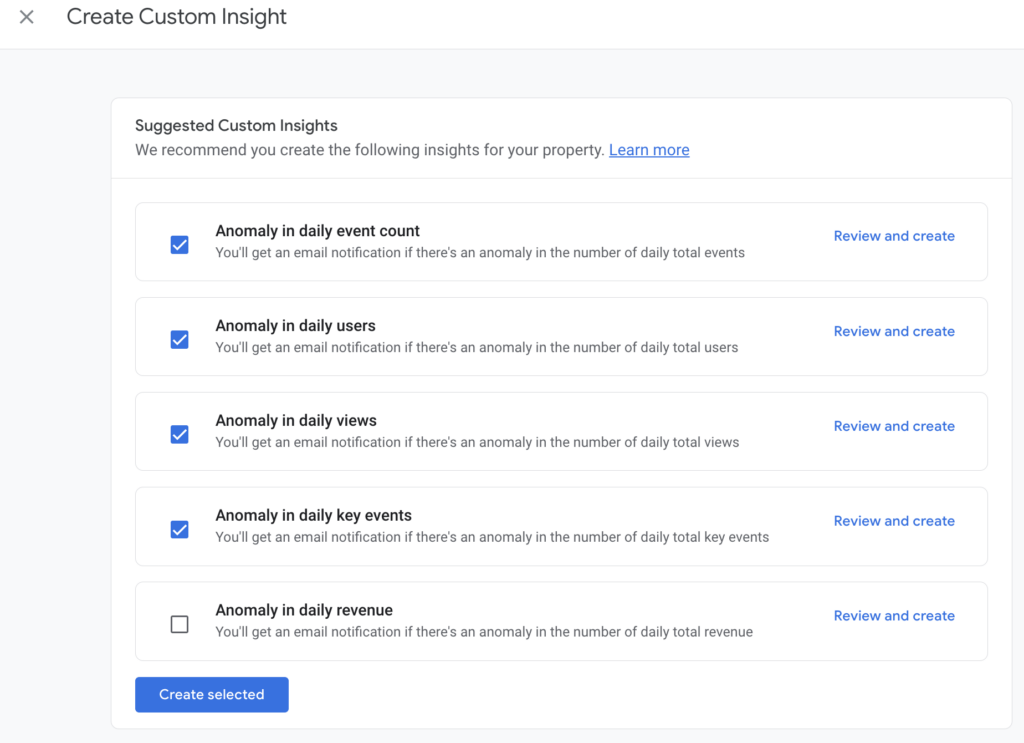
    I created several custom insights including daily report of number of active user, average engagement time per active user, event count per active user and key events count. These custom insights generally take about 24-48 hours to trigger. This allows time for new data to be collected. A notification email will be sent to me when these insights are available. I’ve also created all the suggested custom insights such as anomaly in daily event count, anomaly in daily users and daily views, and anomaly in daily key events. My site does not generate revenue so I left out anomaly in daily revenue from custom insights. AI generated automatic insights and custom insights are quick great ways to help me monitor daily traffic and understand users’ behaviors when visiting my website. A quick snapshot of the collected data shows that life related content seems to be more popular and attract greater users’ engagement compared to posts with technical content. Users are also more likely to give comments on personal content. This might be because users are less familiar with some of the technical engineering concept discussed in my posts or don’t find it very interesting.
  • Geometric Dimensioning and Tolerancing

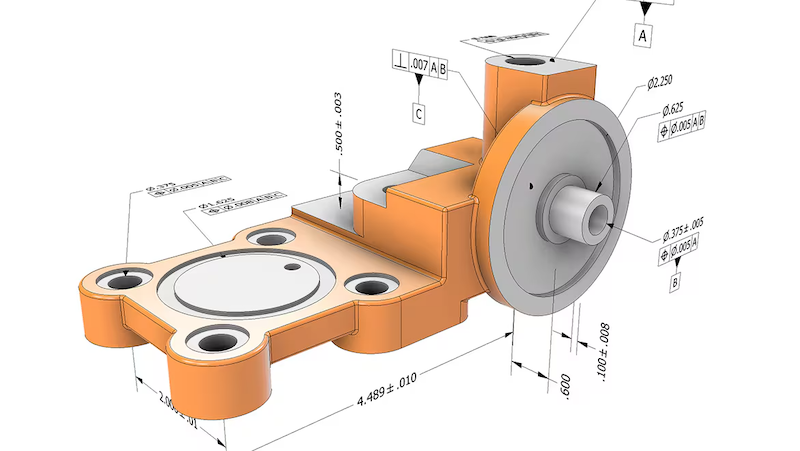
    Image from Autodesk, Geometric dimensioning and tolerancing (GD&T) in design and manufacturing

    In the past couple weeks, I attended another training session at work on Geometric Dimensioning and Tolerancing (GD&T).

    GD&T is a symbolic language used in engineering drawings to define and communicate tolerances or allowable variations in a part. GD&T is governed by ASME Y14.5 standard and is widely used in industries requiring high-precision components such as aerospace and automotive.

    GD&T is a topic that I had briefly learned about in my undergraduate curriculum but had never had the proper training to fully understand the tool. In my early career, it was discouraged to use GD&T in my engineering because it tends to increase the cost of the parts due to high inspection requirements. However, if use correctly, GD&T can reduce the total manufacturing costs by removing ambiguity in the interpretation of design intent, improve assembly fit by allowing functional tolerances and reduce scrap rate. It provides a way for companies to control the quality of parts received from the suppliers and prevents disputes that might lead to increase in procurement cost.

    GD&T History

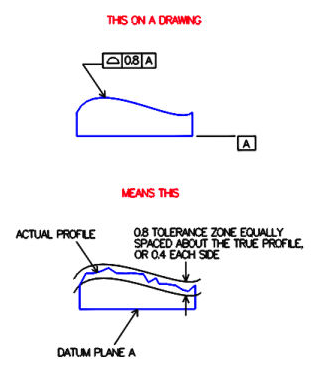
    The concept of GD&T was developed by Stanley Parker, an engineer at the Royal Torpedo Factory in Scotland during World War II. He observed wartime production issue where many parts were being rejected due to imperfect measurements. Even in cases where the discrepancy is small, the parts still fail to meet functional requirements. Parker then came up with the concept of true position (the theoretical exact location of a feature on a part) and tolerance zone (the specific 3D space or boundary that constrain the variation of a feature). In 1940s, the U.S. military developed the first standards for GD&T, MIL-STD-8. In 1982, the American Society of Mechanical Engineers (ASME) released the Y14.5 standard, which inherited and modernized those principles established from the original MIL-STD-8. The latest revision of ASME Y14.5 standard was released in 2018.

    Image from Metal Craft Industries

    GD&T Feature Control Frame

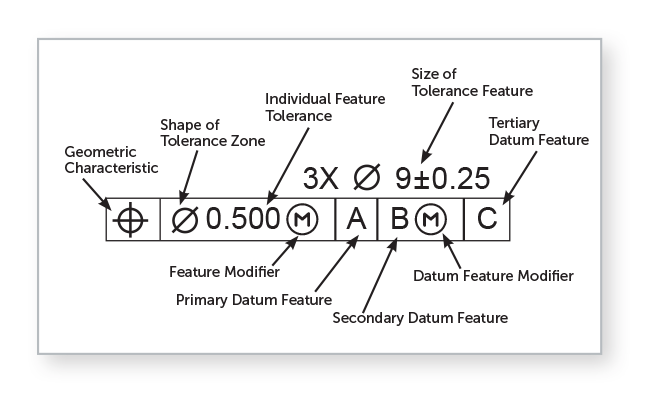
    Image from Fictiv, GD&T 101: Our Guide to Geometric Dimensioning and Tolerancing

    The GD&T feature control frame is used to specify the tolerance values acceptable for a feature of a part. The tolerance value is the difference between the minimum and maximum dimension limits. For example, in the image above, the size of the feature is specified using a diameter symbol with a value 9 and a tolerance zone of plus or minus 0.25. The feature modifier Ⓜ is used to define additional tolerance of 0.500 at maximum material condition (smallest hole or largest pin). The feature is inspected relative to datum features A, B and C (a physical surface or an edge used as a physical contact point for inspection equipment) in order of importance, primary, secondary and tertiary datums.

    GD&T Pros and Cons

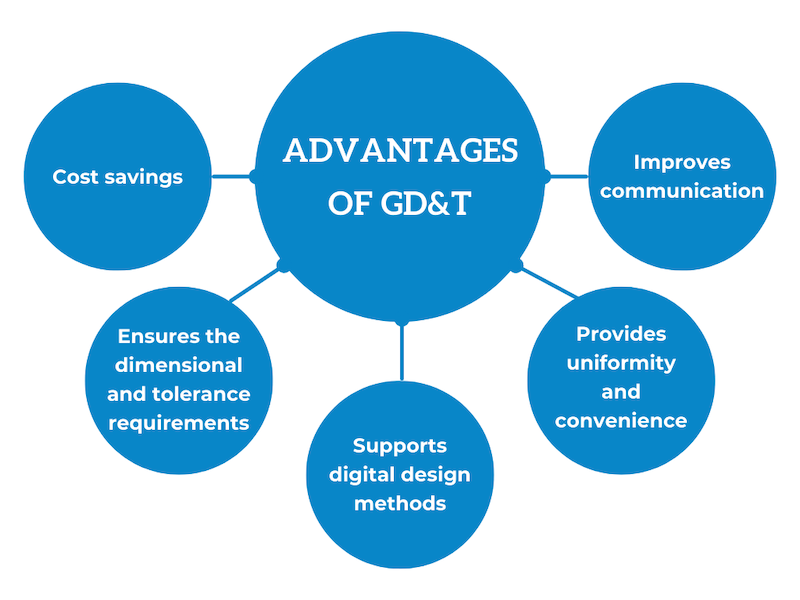
    Image from Eziil, What Are Tolerances in Engineering?

    GD&T provides a clear and complete way to communicate part design intent. It is universally interpretable, meaning that it can be understood in the same by all engineers, suppliers, manufacturers and quality inspectors. GD&T maximizes manufacturer’s freedom and thereby reduces costs.

    One disadvantage of GD&T is that it adds complexity to the drawings during design and review. The language might not be interpret and understood correctly by all manufacturers if not property trained.

    References

    “GD&T Basics – A Comprehensive Introduction to Geometric Dimensioning and Tolerancing.” Five Flute, www.fiveflute.com/guide/gd-t-basics-a-comprehensive-introduction-to-geometric-dimensioning-and-tolerancing/. Accessed 7 Mar. 2026.

    “Geometric Dimensioning and Tolerancing (GD&T) in Design and Manufacturing.” Autodesk, www.autodesk.com/solutions/geometric-dimensioning-and-tolerancing. Accessed 7 Mar. 2026.

    Lindenberger, Chris A. “Definition of Terms- Tolerance Zones.” Metalcraft, 11 Nov. 2018, metalcraftind.com/definition-of-terms-tolerance-zones/.

    “Precision Edge: Bilateral & Unilateral Tolerance.” EZIIL, eziil.com/tolerance-types/. Accessed 7 Mar. 2026.

    Willson, David, et al. “GD&T 101: Our Guide to Geometric Dimensioning and Tolerancing.” Fictiv, www.fictiv.com/articles/gdt-101-an-introduction-to-geometric-dimensioning-and-tolerancing. Accessed 7 Mar. 2026.

  • Estate Planning Tools

    Image from Essential Estate Planning Tools

    What is Estate Planning?

    Estate planning is the process of arranging how your assets will be managed and distributed to beneficiaries after death.

    Source: https://www.legalzoom.com/

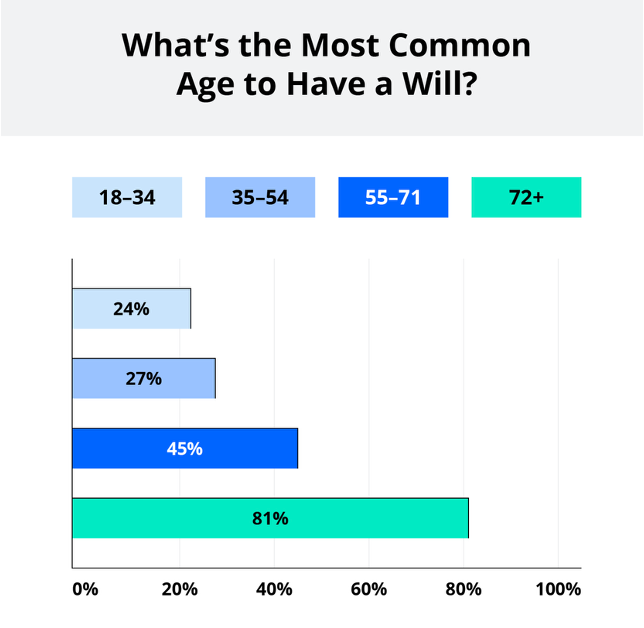
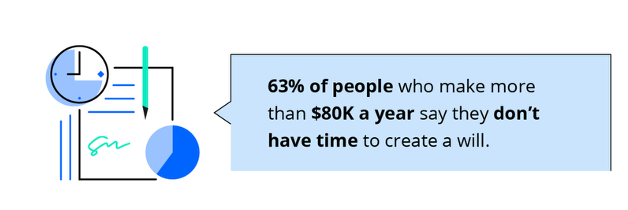
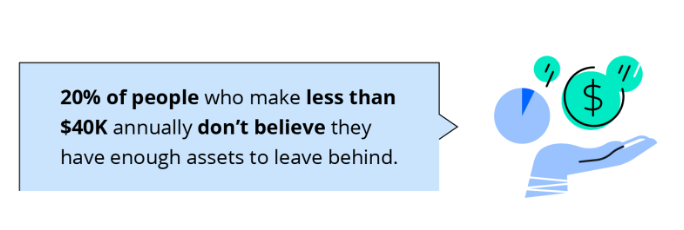
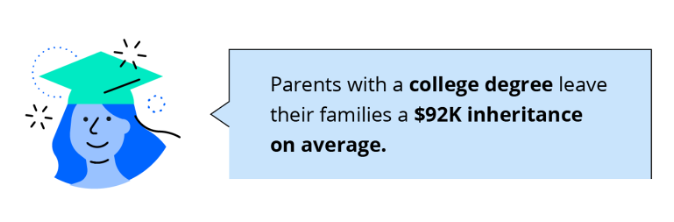
    Will and Educational Factors

    Source: https://www.legalzoom.com/
    Source: https://www.legalzoom.com/
    Source: https://www.legalzoom.com/
    Source: https://www.legalzoom.com/

    FreeWill

    Freewill is a free online estate planning tool that allows users to create a simple will in under 30 minutes. The Freewill website requires the user to sign up for a free account to get started. It has a very user-friendly dashboard that takes the user through a series of questions from start to finish. In the first article, Declarations, the user is asked to provide basic information such as marital status, dependents and approximate value of assets. In this section, the user is also able to define how the assets will be distributed among beneficiaries and declare if he/she wishes to donate any gift to charity. The second article, Executor Provisions, takes the user through identifying the executors (the persons appointed to manage a deceased person’s estate). The user can choose to have a no-contest clause, a provision stating that a beneficiary that challenges the validity of the will in court will be risking their part of the inheritance if they fail to win the trial. This clause is designed to maintain family harmony and ensure that the assets is distributed according to the deceased person’s intent. The user can also choose to add a self-proving affidavit, a separate document attached to the will as a testament that the will has been signed and witnessed in front of a notary public.

    After going through all the questions and provide the necessary information, the user can review and download a copy of their will free of charge. The will needs to be signed in front of a notary public to become legally valid. The testator, creator of the will needs to store the will in a safe location and inform the executors of the location so that it can be found after death. In addition, the Freewill.com website also offer tool to create other types of documents such as Advanced Healthcare Directive (a document that outlines medical treatment preferences if a person is unable to make decision due to illness), Financial Power of Attorney (a document that appoints someone else to make financial design if the person is unable to) and Beneficiary Designation (document that distributes assets not covered in will or other documents).

    The FreeWill online tool is ideal for simple cases where the person does not have a lot assets but it lacks the ability to handle complex estates. The tool cannot provide personalized advice and the legal support that user would be able to get from an attorney. There is limited customization available and the form is designed to be one size fit all. The site makes money by asking the users if they wish to donate to charity and that is how it is able to offer its service for free. Thus, the users need to be cautious and avoid making any unintended decision. It is best to consult an attorney in cases of substantial assets involving businesses, and complex family structure.

    LawDepot

    LawDepot is another online estate planning tool that allows the users to DIY last will and testament document. Similar to FreeWill, to create a will, the users need to go through a series of questions where they are asked to identify executors and beneficiaries. However, this tool does not offer free download of the document and requires the users to sign up for an online subscription costing between $9 to $13 per month. Individual documents can also be purchased at a cost between $8 to $119 depending on complexity. There is a one-week free trial that the users can take advantage of if they are just starting out and want to get a quick free experience with estate planning. With subscription, the user can get access of many different types of documents including Power of Attorney, Gift Deed, Revocable Living Trust (a legal document that outline assets distribution to beneficiaries similar to a will but allow assets to bypass probate) and many more. Aside from estate planning, the LawDepot website also offer real estate forms such as lease agreement and quitclaim deed, as well as business plan and contract. The tool offers more customization options compare to FreeWill with a wide range of documents available. These forms are good for simple cases but again might not be suited for large complex assets. There is no legal advice or support from professional. The user can choose to contact a lawyer or attorney for additional support through LawDepot online website, but this service is not included as part of the subscription.

    Rocket Lawyer

    Rocket Lawyer is an online website that also offers tool for DIY will but requires a subscription. There is a free trial available for 7 days similar to LawDepot. After the free trial period, the user has the options to pay a monthly subscription of $39.99 to or $239.88 for an annual subscription which can be paid in 4 installments throughout the year. The users can fill out the last will and testament template by answering a series of questions similar to the previous tools discussed above. One interesting feature in this will template that is not offered in the previous tools is that the users are asked if they want to purchase an executor bond (a court requirement for the person appointed to manage the deceased person’s assets to purchase a surety bond, an insurance protecting beneficiaries from executor fraud) and if they would like for the executor to receive compensation for serving. There are also specific questions regarding the executor personal liability in performing the duty and if the executor is allowed handle disputes between beneficiaries. Similar to other online estate planning tools, Rocket Lawer offers convenience and speed for individual with simple assets. There is a variety to documents available for different legal needs. With DIY tools, there is always a risk of error if the user is not at all familiar with the terms used in estate planning. Personalized advice or professional support is not included in the standard subscription, and the user will be charged additional fees for the special service.

    Risks of Using Online Estate Planning Tools

    Online will-making tools do not offer tailored advice for different situations, and the user is responsible for understanding the terms and provisions and providing accurate information of their assets. The document is not reviewed by a professional and thus any error made by the user can lead to legal dispute and high long-term cost. The asset distribution might not be optimized for tax planning. Estate planning requires more than just simply creating a will or a document. The user needs to have an understanding of the legal processes (such as probate) involved and the timeline for when and how the assets will be distributed. This is important information that are not well explained on these online platforms. Online platforms have standard templates that are designed to be one size fit all. These templates might not be valid for all due to different state laws. Online tools will not be able to guide users through updating their will for major life changes such as getting married or divorced or loss of a beneficiary.

    Click on links below to try out these estate planning tools

    FreeWill

    LawDepot

    Rocket Lawyer