Category: My Learning

  • Mechatronic Project – Arcade Game Machine

    One of the most fun and interesting projects that I’ve worked on during undergraduate was for a mechatronic class where I and my team designed and built and arcade game machine from scratch. The project inspiration started with the extra LED lights leftover from the midterm project. Our team wanted to exploit the power of LEDs and utilize them for the final. Many different ideas were considered, and we initially settled on a TV screen. The TV screen can be used for displaying animations and music videos, but the idea of a video game was enticing. Combining the two concepts, we started to work on wiring the LEDs to a prototype PCB. As the screen was being made, the idea of developing an Arcade cabinet to turn the TV screen into an Arcade machine inspired the team and this became our final project proposal. I was responsible for building the Pacman game and assisted with electrical wiring as well as programming music. Below is an embedded Youtube video of our final product.

    Arcade Cabinet Construction and Design Functionality
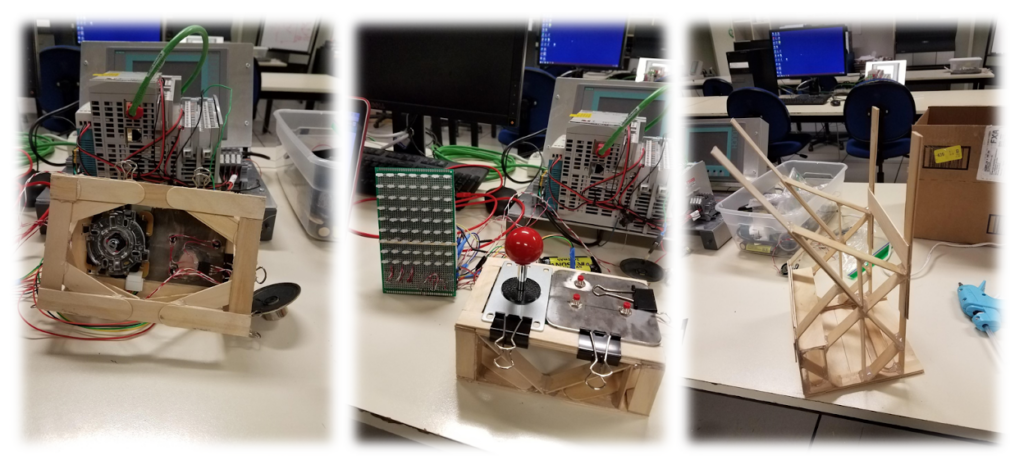
    The Arcade Cabinet was designed to mimic the functionality of a real video arcade machine. Functionality includes ergonomic joypad, ease of access for maintenance, glare shroud, electrical inner storage, and aesthetics. The main materials of the cabinet include popsicle sticks, hot glue, foam poster board, felt padding, a cup holder, and Rubbermaid plastic.
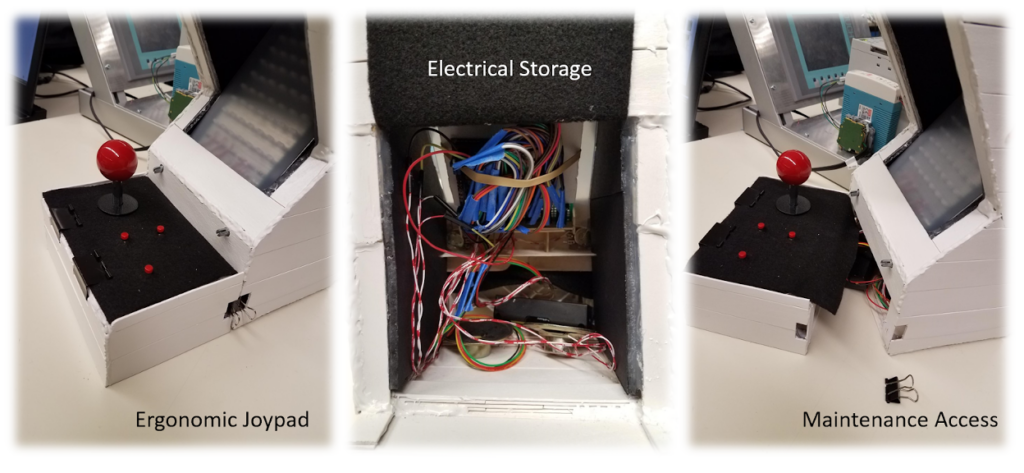
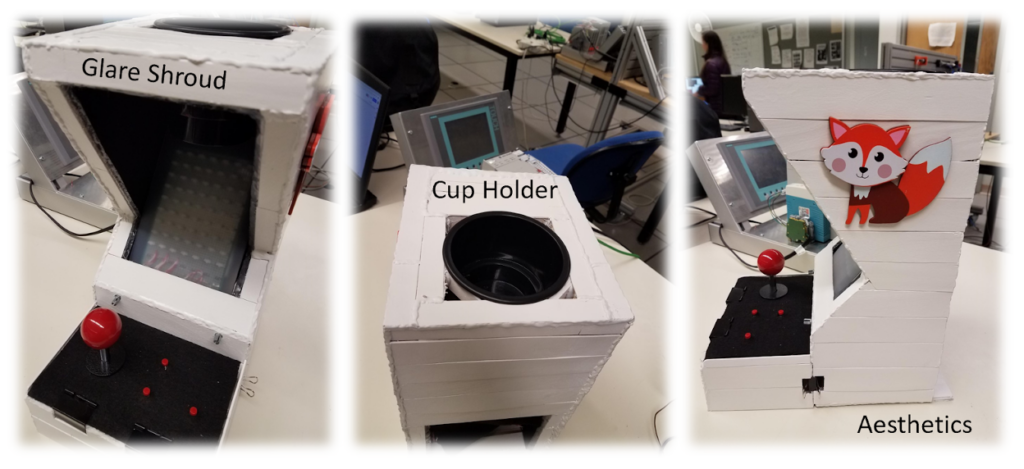
    The ergonomic joypad was covered in felt padding for comfort and was designed to be separate from the main cabinet to provide ease of access for maintenance. The maintenance access is essential for wire assembly and troubleshooting. The joystick and button wires feed under the joypad and into the electrical inner storage area, which is located at the base of the arcade cabinet. The electrical storage area is home to all the wires connecting to the uc32 microcontroller board. It is also home to a dual battery power source and twin speakers. A fun highlight of the team’s arcade machine is a cup holder for the user’s beverage. The cupholder is located on top of the cabinet, which sets just above the video screen.

    Electrical Design

    Wiring Diagram
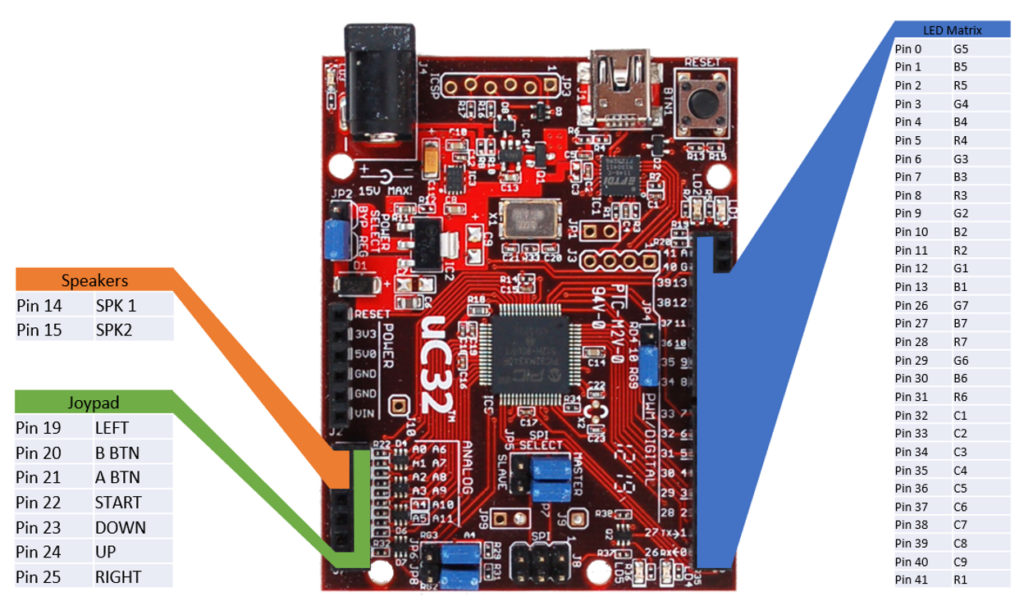
    The size of the LED matrix was determined by the number of I/O pins available on the uC32, using all the pins on the right side and leaving the left side open for other devices. The arcade machine uses all but 3 I/O pins available.

    All wiring and routing is done on the prototype PCB, this eliminates the need for a breadboard and creates a more compact design, male and female headers are used to make connecting the prototype PCB to all other components easy and organized.

    LED Matrix
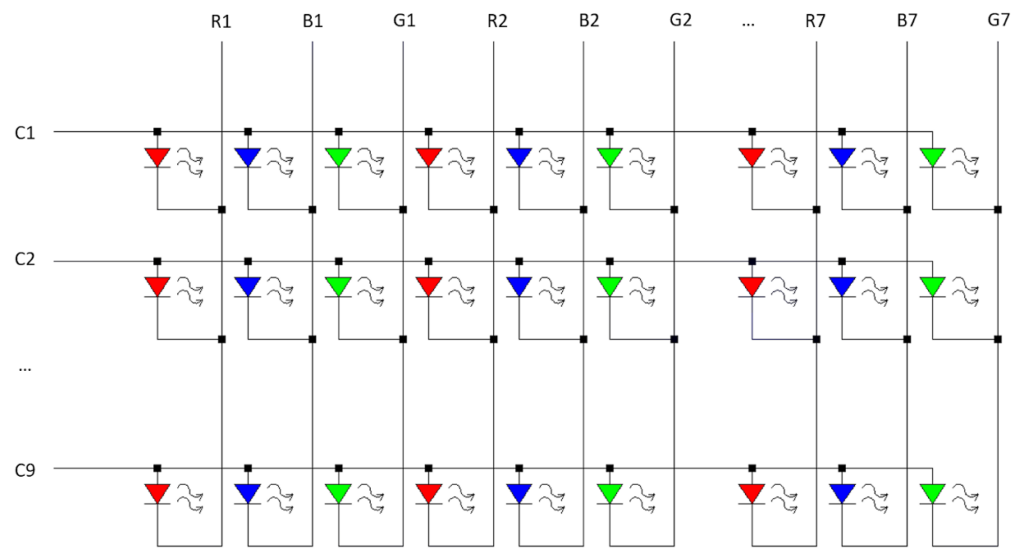
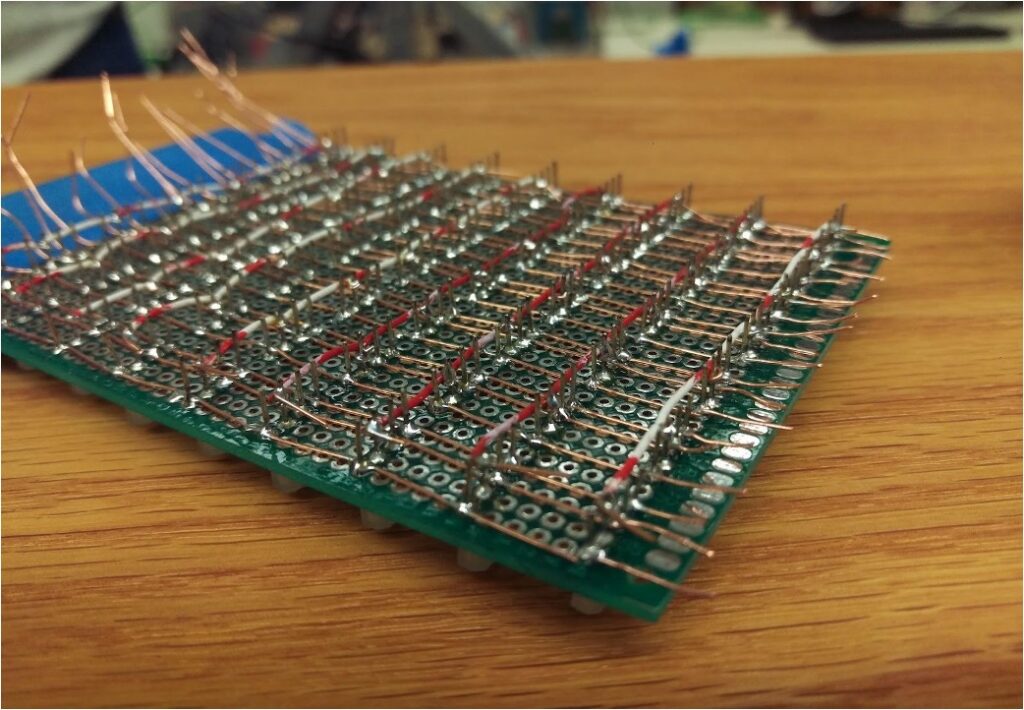
    The common anode RGB LEDs are wired in a matrix as depicted above. This method allows us to control 189 individual LEDs using only 30 pins. To turn on an LED, the desired row (C1-C9) is set to HIGH and the desired colors are set to LOW. while it’s possible to set the entire row at once, each LED is scanned individually as the uC32 cannot supply enough power for multiple LEDs at once without losing color accuracy.
    Joypad
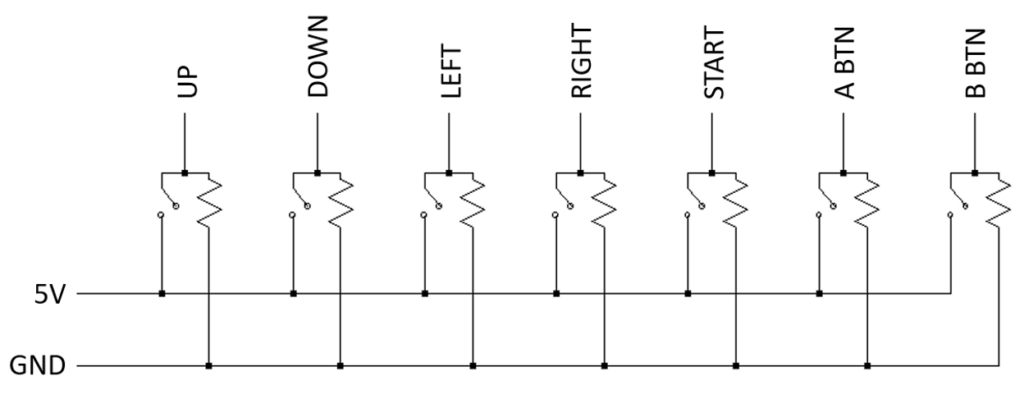
    The joypad is a simple input device consisting of a joystick and 3 separate momentary switches. Though it would have been possible to wire the buttons in a matrix to use less pins, the increased complexity was not worth opening a single pin. All inputs are digital and pulled down to ground when not activated and can be used simultaneously.

    Speakers
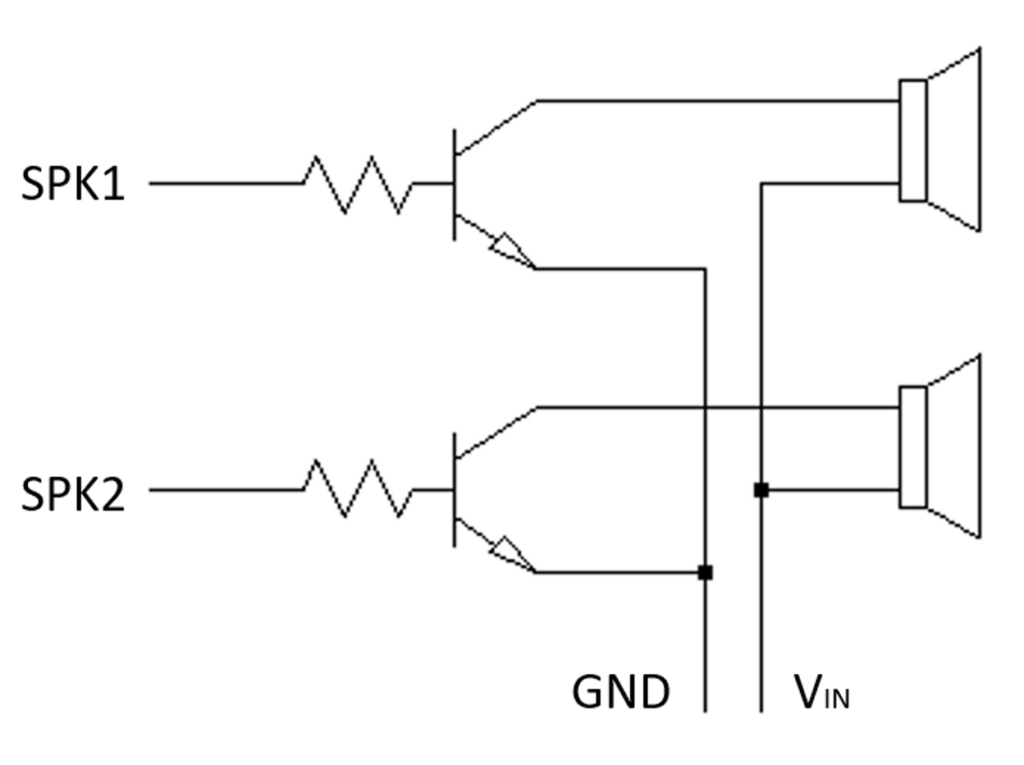
    The speakers were originally connected directly to the uC32 and ground. Due to the low but audible sound, a transistor was implemented to amplify the signal. In addition, potentiometers were added before the amplifier to control the volume of each speaker individually. Though it would have been possible to use the DAC on the uC32 for more sophisticated control of the speakers, however, the simpler control method suited the needs for the project.

    Featured Games
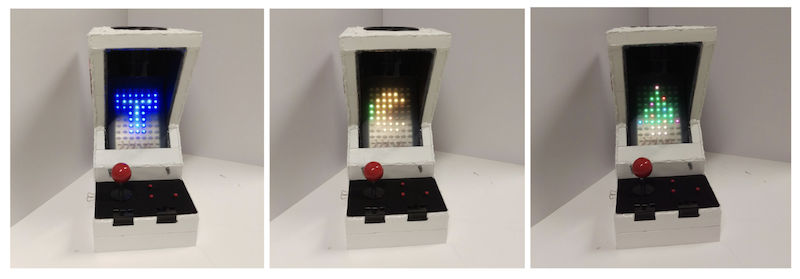
    The Arcade machine menu is a selection of games consisting of Tetris and Pacman. The Tetris game is played with two push buttons and the joystick. The push buttons are used to change the block orientation and the joystick allows the block to be moved left, right, up and down the screen. There is no level up in the game. However, the game difficulty increases with each additional line completed. The Pacman game utilizes only the joystick as physical input. The user can move Pacman in four directions, left, right, up and down the maze. The game has four main built-in levels with increasing difficulty in the maze pattern and in the ghosts’ speed. From the main menu, the user can also listen to Jingle Bell while watching the colored Christmas tree being displayed on the screen.
  • Geometric Dimensioning and Tolerancing

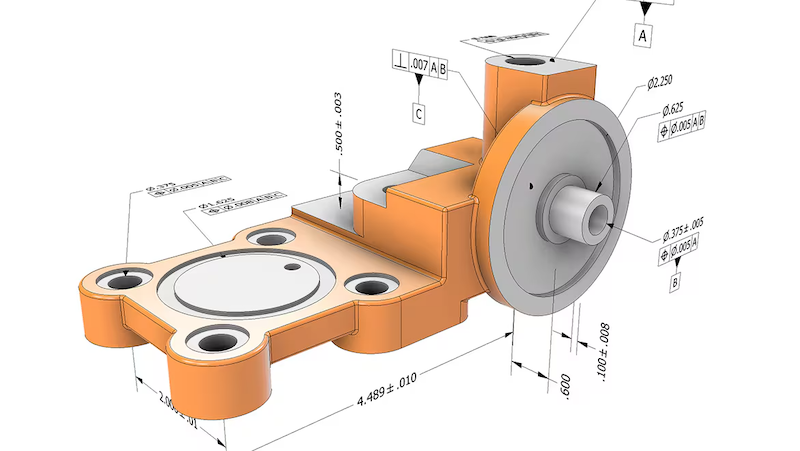
    Image from Autodesk, Geometric dimensioning and tolerancing (GD&T) in design and manufacturing

    In the past couple weeks, I attended another training session at work on Geometric Dimensioning and Tolerancing (GD&T).

    GD&T is a symbolic language used in engineering drawings to define and communicate tolerances or allowable variations in a part. GD&T is governed by ASME Y14.5 standard and is widely used in industries requiring high-precision components such as aerospace and automotive.

    GD&T is a topic that I had briefly learned about in my undergraduate curriculum but had never had the proper training to fully understand the tool. In my early career, it was discouraged to use GD&T in my engineering because it tends to increase the cost of the parts due to high inspection requirements. However, if use correctly, GD&T can reduce the total manufacturing costs by removing ambiguity in the interpretation of design intent, improve assembly fit by allowing functional tolerances and reduce scrap rate. It provides a way for companies to control the quality of parts received from the suppliers and prevents disputes that might lead to increase in procurement cost.

    GD&T History

    The concept of GD&T was developed by Stanley Parker, an engineer at the Royal Torpedo Factory in Scotland during World War II. He observed wartime production issue where many parts were being rejected due to imperfect measurements. Even in cases where the discrepancy is small, the parts still fail to meet functional requirements. Parker then came up with the concept of true position (the theoretical exact location of a feature on a part) and tolerance zone (the specific 3D space or boundary that constrain the variation of a feature). In 1940s, the U.S. military developed the first standards for GD&T, MIL-STD-8. In 1982, the American Society of Mechanical Engineers (ASME) released the Y14.5 standard, which inherited and modernized those principles established from the original MIL-STD-8. The latest revision of ASME Y14.5 standard was released in 2018.

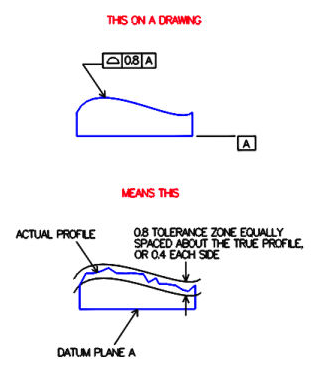
    Image from Metal Craft Industries

    GD&T Feature Control Frame

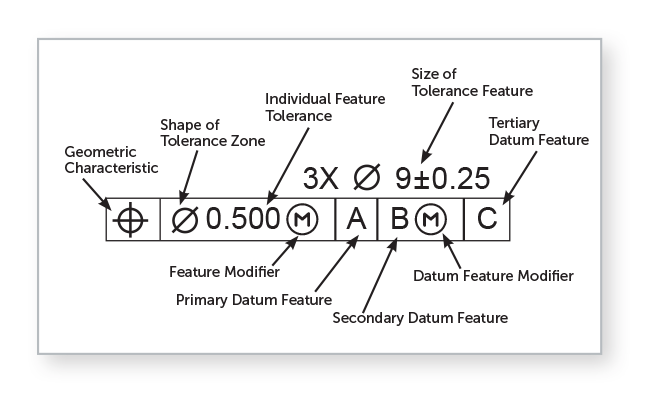
    Image from Fictiv, GD&T 101: Our Guide to Geometric Dimensioning and Tolerancing

    The GD&T feature control frame is used to specify the tolerance values acceptable for a feature of a part. The tolerance value is the difference between the minimum and maximum dimension limits. For example, in the image above, the size of the feature is specified using a diameter symbol with a value 9 and a tolerance zone of plus or minus 0.25. The feature modifier Ⓜ is used to define additional tolerance of 0.500 at maximum material condition (smallest hole or largest pin). The feature is inspected relative to datum features A, B and C (a physical surface or an edge used as a physical contact point for inspection equipment) in order of importance, primary, secondary and tertiary datums.

    GD&T Pros and Cons

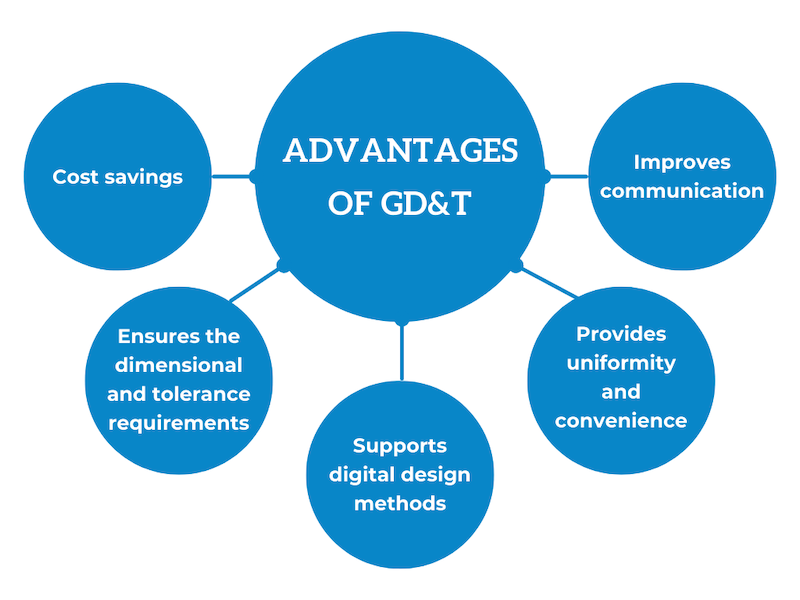
    Image from Eziil, What Are Tolerances in Engineering?

    GD&T provides a clear and complete way to communicate part design intent. It is universally interpretable, meaning that it can be understood in the same by all engineers, suppliers, manufacturers and quality inspectors. GD&T maximizes manufacturer’s freedom and thereby reduces costs.

    One disadvantage of GD&T is that it adds complexity to the drawings during design and review. The language might not be interpret and understood correctly by all manufacturers if not property trained.

    References

    “GD&T Basics – A Comprehensive Introduction to Geometric Dimensioning and Tolerancing.” Five Flute, www.fiveflute.com/guide/gd-t-basics-a-comprehensive-introduction-to-geometric-dimensioning-and-tolerancing/. Accessed 7 Mar. 2026.

    “Geometric Dimensioning and Tolerancing (GD&T) in Design and Manufacturing.” Autodesk, www.autodesk.com/solutions/geometric-dimensioning-and-tolerancing. Accessed 7 Mar. 2026.

    Lindenberger, Chris A. “Definition of Terms- Tolerance Zones.” Metalcraft, 11 Nov. 2018, metalcraftind.com/definition-of-terms-tolerance-zones/.

    “Precision Edge: Bilateral & Unilateral Tolerance.” EZIIL, eziil.com/tolerance-types/. Accessed 7 Mar. 2026.

    Willson, David, et al. “GD&T 101: Our Guide to Geometric Dimensioning and Tolerancing.” Fictiv, www.fictiv.com/articles/gdt-101-an-introduction-to-geometric-dimensioning-and-tolerancing. Accessed 7 Mar. 2026.

  • Composite Layup Manufacturing

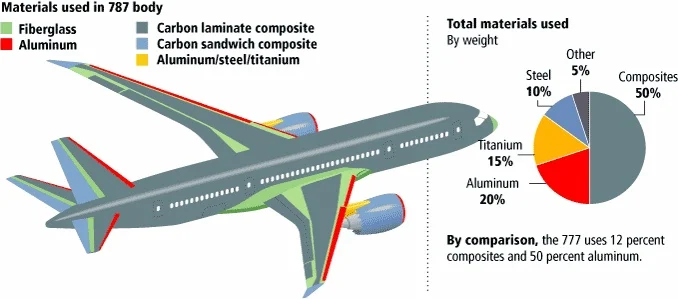
    In the past week, I had an opportunity to take part in a hands-on training session at work where I learned about the manufacturing process of composite panels. Composite is a man-made material created by combining two or more different materials of different mechanical and chemical properties, typically reinforced carbon fiber combined with resin. Carbon fiber is a fabric like material with high-strength and high flexibility whereas resin is a liquid plastic that is cured to hold the fibers in place. Composites are widely used in aircraft bodies as well as wing structure due to its light-weight and durability.

    Image from Appropedia, Composites in the Aircraft Industry

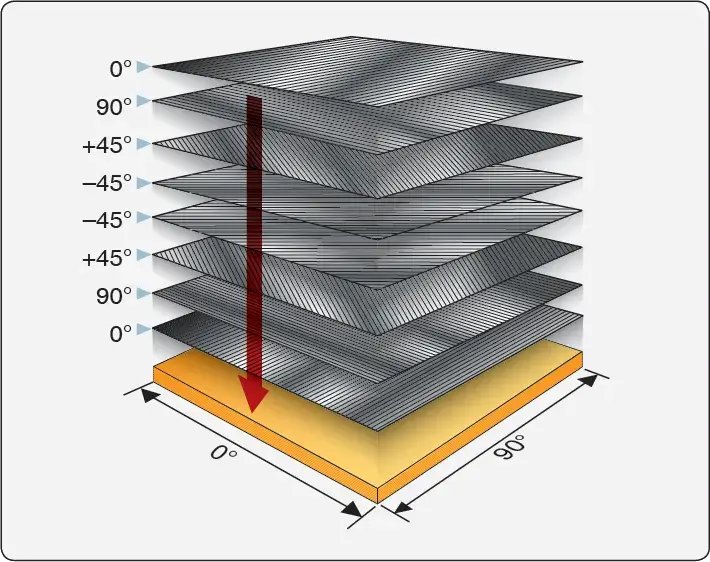
    Composite layup is a manufacturing process involves stacking up carbon fiber layers, typically in a mixed of different fiber orientations (0o, 45o, 90o, -45o), form into shape using mold and then seal in an air-tight vacuum-bag using atmospheric pressure to compress the layers together. The sealed bag is then cured in an oven with heat and pressure to transform it into high-performance engineered material. The layup process is done manually and is very time consuming and requires high level of skill and precision.

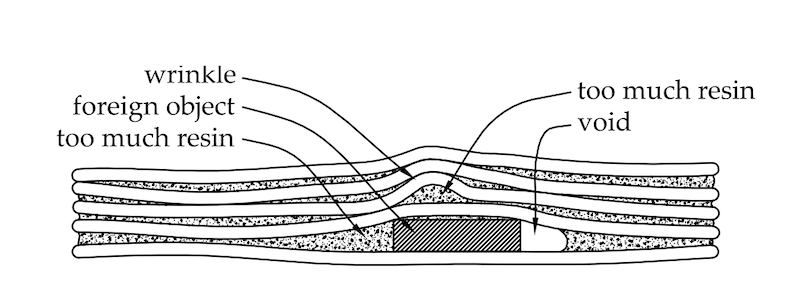
    Because composite is a man-made material, the manufacturing process if not done in a controlled environment can produce many different defects. The orientation of the fiber is very important in determining the strength of the final part. Human errors such as placing a layer in the wrong orientation or simply leaving out a layer can reduce the strength of the material. Other types of defects such as having a bag leak can result in air gaps in between the layers leading to delamination. The forming process can also produce wrinkles in the panel. Foreign objects can get in between the layers, leading to having too much resin or too much void in some areas of the panel after the curing process. These types of defects produce inconsistent mechanical properties and reduce the fatigue strength of composites. Defects are accounted for in engineering analysis to ensure that the part can withstand its ultimate load case.

    Composite manufacturing is a labor intensive manual process and can expose workers to toxic chemicals. Raw material typically costs over $36 per pound, adding to its high production cost. Large aerospace companies typically try to offset the cost by outsourcing the work to smaller and international suppliers for cheap labor.

    Weight is a critical factor in determining the performance and operational cost of an aircraft. Therefore, composite materials, though expensive to manufacture, still has an advantage over steel or aluminum due to it being incredibly light weight in comparison.

  • A Week as a Mechanic

    Image from National Aviation Academy, “What Does an Aircraft Mechanic Do?”

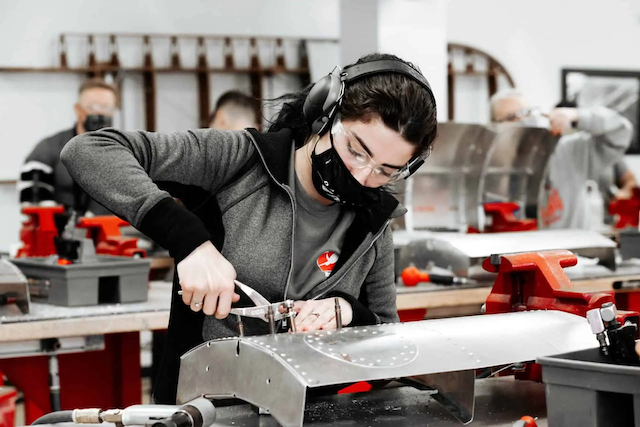
    Over the past week, I had the opportunity to take a training session where I get to experience working as a mechanic. The training was designed for engineers to get a perspective on what a mechanic has to go through to build and assemble a product.

    It was a very unique experience for me as I get to learn how to use all the power tools that I don’t normally have a chance to, such as drill motor, hilok runner and rivet gun. Prior to the training, I did not know that it requires multiple steps to drill just a single fastener point, from positioning the point to drilling pilot hole and aligning parts to drilling full-size hole. Being a mechanic is physically demanding and takes a lot of skill to build a product that passes quality inspection. Oftentimes, rework is required for any job that does not meet quality check, and the process of rework can cause more damage to the part than what it started with.

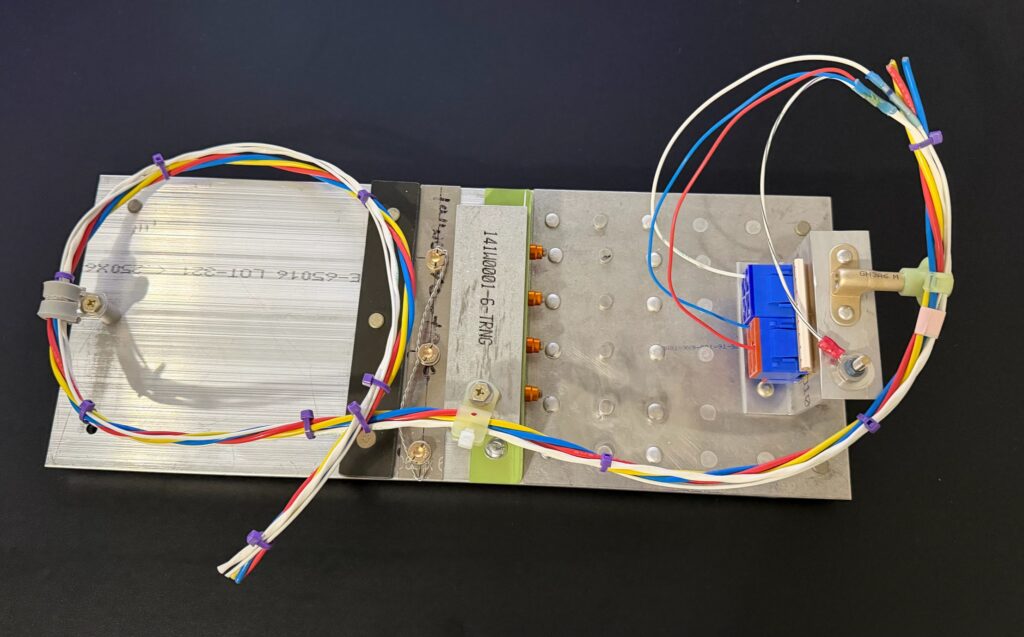
    Toward the end of the week, I also got to learn a little bit about wiring, how to put together a wire bundle and bonding and grounding check. Electrical work requires certification and all mechanics have to go through rigorous training in order to be certified to work on the part. They also have to get tested to renew their certificates every year.

    This training experience has enabled me to get a better understanding of the build process and what it takes to manufacture a product. Since I work as a design engineer, I get to develop the product from the very early conceptual stage. Having this experience will definitely help be become a better designer and hopefully be able to make the work of the mechanics a little easier through simple and thoughtful design.

    The image above shows the assembly that I built over the course of the training. The assembly was released to me as a personal property to take home at the end of the week. It does not contain company proprietary information.